Accounts Payable Automation: Streamlining Financial Operations for 2026

Discover how to eliminate manual data entry, reduce errors, and gain real-time financial visibility through a unified accounts payable automation strategy.
For finance managers at growing companies, the accounts payable process can feel like a constant battle against paper stacks, manual errors, and information silos. Lost invoices, late payment penalties, and a frustrating lack of visibility into cash flow are not just daily annoyances; they are significant barriers to scaling your operations. The core challenge is clear: how can you automate your accounts payable process to save time and reduce errors without disrupting your existing systems?
The answer lies in treating AP automation not as a standalone tool, but as a strategic component of your financial ecosystem. It’s about creating a seamless bridge between procurement, inventory, and cash management—a goal that is only truly achievable within a unified platform such as Kechie ERP.
Organizations that adopt accounts payable automation software often discover that AP becomes more than a back-office process. When connected to procurement and inventory management, automated AP workflows improve financial visibility, reduce operational risk, and support more accurate cash flow planning.
Key Takeaways
- Transition from manual invoice processing to structured accounts payable automation workflows to improve accuracy and efficiency.
- Understand the operational advantages of a unified ERP architecture compared to disconnected financial tools.
- Improve financial operations by integrating accounts payable automation software with procurement and inventory management.
- Gain real-time financial visibility into vendor balances, liabilities, and payment schedules.
- Discover how Kechie ERP enables a fully connected procure-to-pay automation environment.
What is Accounts Payable Automation and Why Is It Critical in 2026?
Accounts payable automation represents the end-to-end digitalization of the vendor payment lifecycle. Instead of relying on paper invoices, spreadsheets, or manual entry, organizations implement automated invoice processing workflows that capture transactions, validate purchasing records, and route approvals digitally.
Modern accounts payable automation software ensures that invoices generated from purchase orders, vendor bills, or internal vouchers enter a centralized system where they can be validated against procurement and vendor data. This procurement-driven structure ensures financial records align with operational activity.
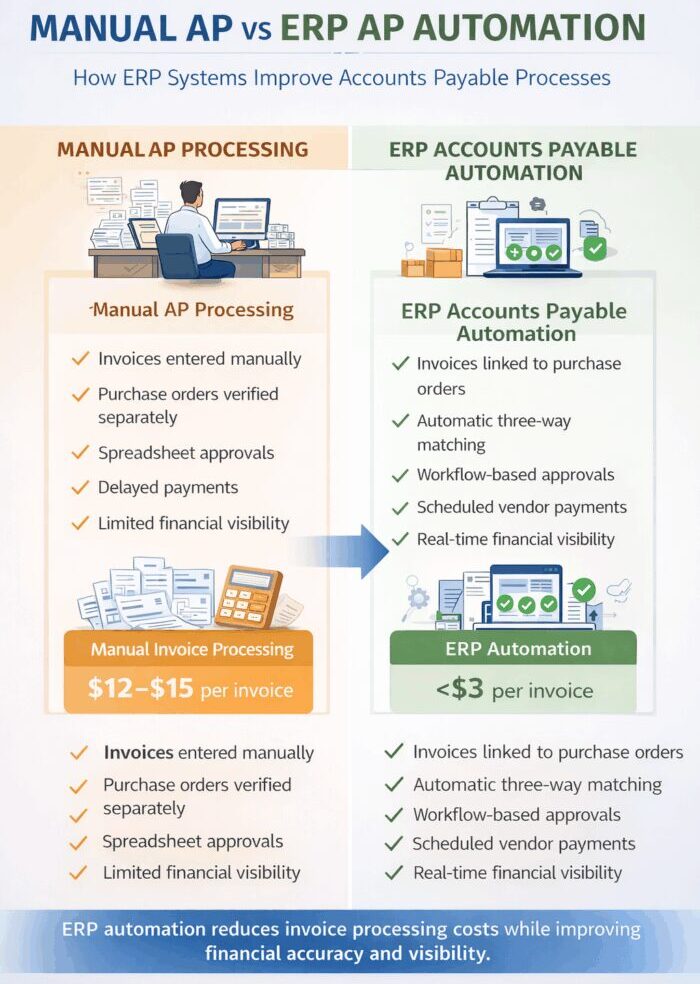
Manual invoice processing continues to be one of the most inefficient financial workflows in many organizations. Studies show that processing invoices manually can cost companies more than $12 per invoice when labor, corrections, and approval delays are considered.
By contrast, organizations implementing AP workflow automation significantly reduce processing costs while improving financial visibility.
To better understand the transformation, it helps to view AP automation through the AP Automation Maturity Model.
- Paper-Based: Invoices arrive as physical documents that must be manually entered into accounting systems and routed through email or paper approvals.
- Semi-Automated: Some invoice capture occurs digitally, but approvals and validations still require manual intervention.
- Fully Automated: Invoices generated from procurement workflows or financial vouchers move automatically through approval workflows and financial validation processes as part of a procure-to-pay (P2P) automation system.
Organizations operating at this stage experience faster processing cycles and significantly improved financial control.
The Mechanics of Efficiency: How AP Automation Works
A modern accounts payable automation workflow replaces slow manual processing with a structured digital process.
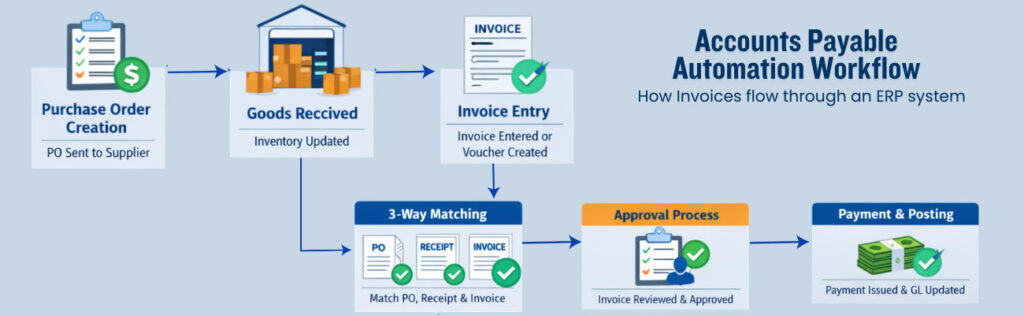
- Step 1: Procurement and Voucher-Based Invoice Capture: Invoices originate from purchase orders, goods receipts, vendor bills, or internal vouchers, ensuring every payable transaction is tied directly to procurement and inventory records. Within an integrated platform like Kechie ERP, these transactions flow seamlessly from purchasing into financial records.
- Step 2: Automated Data Validation: Invoice data such as vendor name, invoice totals, and payment terms are digitally captured and validated against vendor records and purchase orders. This eliminates manual entry while ensuring data accuracy.
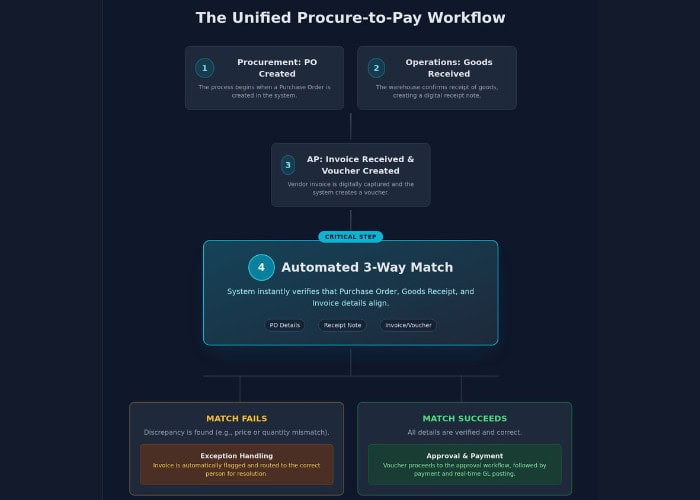
- Step 3: The 3-Way Match: The system automatically compares the vendor invoice with the purchase order and the goods receipt record. This three-way matching process ensures companies only pay for products that were properly ordered and received.
- Step 4: Exception Handling: Invoices that fail validation—due to price discrepancies or quantity mismatches—are automatically routed to the appropriate team member for review. This ensures finance teams focus only on invoices that require attention.
Mastering the 3-Way Match in Manufacturing and Distribution
For companies managing physical inventory, the 3-way match is the cornerstone of financial control.
This process compares:
- vendor invoices
- purchase orders
- goods receipts
If the documents align, invoices move forward automatically in the approval process.
By connecting accounts payable directly with procurement and inventory records, organizations prevent duplicate payments and incorrect vendor billing.
When implemented within an integrated ERP platform such as Kechie ERP, this validation process becomes part of a broader procure-to-pay workflow supported by procurement management systems and integrated financial operations.
Siloed Apps vs Unified ERP: Choosing the Right Architecture
Selecting the right technology architecture is one of the most important decisions organizations make when implementing financial automation.
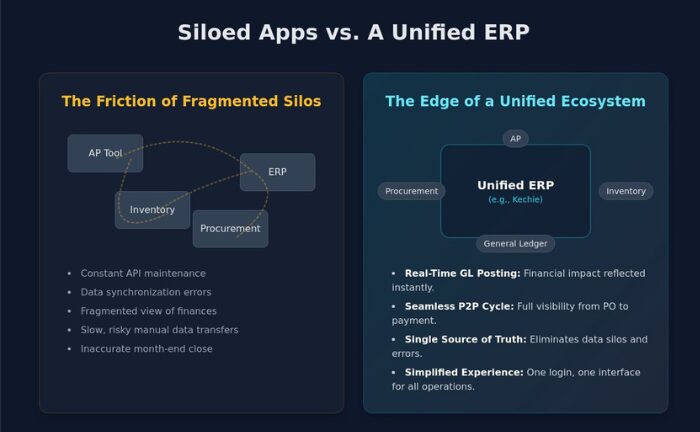
Many companies rely on disconnected applications for procurement, accounting, and invoicing. While these systems may work independently, they often introduce hidden operational inefficiencies.
When financial data must be manually transferred between systems, errors become more likely and financial reporting becomes more complex.
A unified ERP architecture eliminates these challenges by centralizing operational and financial data within a single environment such as Kechie cloud ERP.
Integrated ERP systems connect purchasing, inventory management, and accounting processes so that operational activity automatically updates financial records.
Businesses exploring this approach often begin with integrated ERP financial management systems that allow finance teams to track liabilities and vendor balances in real time.
The Unified Edge: Kechie’s Integrated Ecosystem
Kechie ERP was designed to eliminate inefficiencies created by disconnected business software.
Within Kechie, accounts payable automation operates as an integrated component of the broader procure-to-pay process.
Invoices are connected directly to purchase orders and goods receipts, allowing the system to validate transactions automatically before payment approval.
This unified environment provides several advantages:
- real-time financial visibility
- centralized vendor management
- automated invoice validation
- simplified approval workflows
Because operational and financial data exist within the same system, teams no longer need to reconcile information across multiple applications.
A Strategic Roadmap for Implementing AP Automation
Transitioning to accounts payable automation software requires a structured approach.
- Conduct a Workflow Audit: Evaluate your existing AP process to identify bottlenecks and manual tasks.
- Clean Vendor Master Data: Accurate vendor records ensure automated workflows operate correctly.
- Define Approval Hierarchies: Establish approval rules based on invoice value and departmental policies.
- Launch a Phased Rollout: Begin with vendors generating the highest invoice volume before expanding automation across the organization.
- Focus on Change Management: Automation frees finance teams from repetitive data entry and enables them to focus on strategic financial analysis using integrated ERP financial management tools.
Setting Your KPIs for Success
Organizations implementing accounts payable automation should track key performance indicators such as:
- Cost per invoice
- Days Payable Outstanding (DPO)
- Straight-through processing rate
- Exception rate
Monitoring these metrics helps organizations evaluate the operational impact of automation.
Overcoming Common Implementation Hurdles
Vendor onboarding is often the most common challenge when implementing AP automation.
Encouraging vendors to submit invoices through standardized procurement workflows improves accuracy and reduces processing delays.
Organizations must also ensure their financial systems comply with accounting standards and regulatory requirements.
Working with a modern ERP platform simplifies this transition by integrating compliance, financial reporting, and operational workflows.
Ready to Streamline Your Financial Operations?
Organizations that implement accounts payable automation reduce manual workload, improve financial accuracy, and gain better visibility into vendor liabilities.
If you want to see how a unified ERP platform supports automated invoice processing and financial automation, schedule a Kechie ERP demo to explore how integrated financial management can simplify your operations.
Frequently Asked Questions (FAQs)
What is accounts payable automation?
Accounts payable automation is the use of digital workflows and software systems to capture, validate, approve, and process vendor invoices without manual data entry.
What is the difference between AP automation and electronic invoicing?
Electronic invoicing refers only to sending invoices digitally. Accounts payable automation manages the entire invoice lifecycle—from validation to approval and payment.
How does AP automation improve financial visibility?
Because invoice data is recorded immediately and connected to procurement records, finance teams gain real-time visibility into liabilities and payment schedules.
Can AP automation integrate with procurement systems?
Yes. In ERP platforms like Kechie, accounts payable automation operates as part of a larger procure-to-pay workflow, connecting purchasing, inventory, and financial operations.
How much time can AP automation save?
Many companies reduce invoice processing time by up to 75% after implementing automated workflows.
Does AP automation replace accounting teams?
No. Automation removes repetitive manual tasks, allowing finance professionals to focus on financial planning, vendor management, and strategic decision-making.
What industries benefit most from accounts payable automation?
Distribution, manufacturing, wholesale, and supply chain businesses benefit significantly because their financial workflows are closely tied to procurement and inventory management.
How long does it take to implement AP automation?
Implementation timelines vary depending on system complexity and vendor onboarding, but many organizations deploy automation in phases over several weeks.
Schedule a Free Demo Today!
See how Kechie ERP can transform your business, save you time, money, and aggravation. Click the button below to schedule your free demo.
Schedule Your Kechie Demo Now!In This Article
-What is Accounts Payable Automation and Why Is It Critical in 2026?
-The Mechanics of Efficiency: How AP Automation Works
-Mastering the 3-Way Match in Manufacturing and Distribution
-Siloed Apps vs Unified ERP: Choosing the Right Architecture
-The Unified Edge: Kechie’s Integrated Ecosystem
-A Strategic Roadmap for Implementing AP Automation
-Setting Your KPIs for Success
-Overcoming Common Implementation Hurdles
-Frequently Asked Questions