ERP for Food Services: A Buyer’s Guide to Lot Tracking, Catch Weight, and Traceability (2026)
If a customer, auditor, or retail partner asked you right now to produce every lot number, supplier, and shipment record tied to a single pallet of product — how long would it take your team to answer?
For most growing food and beverage companies, the honest answer is: too long. The information exists, but it lives across a receiving spreadsheet, a production log, a separate inventory tool, and someone’s memory of which truck picked up which order. Pulling it together takes phone calls, manual cross-referencing, and a few hours nobody had budgeted for.
That gap — between having the data somewhere and being able to produce it on demand — is the real operational problem behind food traceability. It shows up during a recall. It shows up when a retailer’s compliance team flags a shipment. And increasingly, it shows up in everyday vendor scorecards, long before any regulator gets involved.
This guide is for teams already evaluating an ERP for exactly this reason. What to look for, what to skip, and how to tell a system built for food and beverage operations from one that was adapted for it after the fact.
Why Traceability Pressure Is Rising Now
Food traceability isn’t a new concept, but the urgency around formalizing it has accelerated from two directions at once.
The first is regulatory. The FDA’s Food Traceability Rule — FSMA Section 204 — requires companies that manufacture, process, pack, or hold foods on the FDA’s Food Traceability List to maintain detailed records called Key Data Elements (KDEs), tied to specific points in the supply chain called Critical Tracking Events (CTEs). When the FDA requests those records, companies have 24 hours to produce them. The original compliance deadline was January 2026. The FDA extended it 30 months to July 20, 2028, and Congress made that extension binding through appropriations legislation.
The second source of pressure is commercial — and it hasn’t moved at all. Major retailers and large foodservice distributors are already enforcing their own traceability and labeling requirements on suppliers, with vendor scorecard penalties and chargebacks for shipments that don’t comply. For a food company selling into mass retail or large distribution accounts, the date that actually matters is often not 2028. It’s whatever your largest customer’s contract already says.
The practical takeaway: the federal deadline is the floor, not the ceiling. Building traceability into how you operate every day — rather than treating it as a project with a 2028 finish line — is what keeps you on the right side of both fronts.
What Traceability-Ready Food Operations Actually Need
Strip away the regulatory language and the operational requirement is straightforward: when a question is asked, the answer should already exist in your system — not need to be assembled.
That requires a specific set of capabilities working together as a single connected record, not as a collection of standalone tools that have to be manually reconciled at the end of the day.
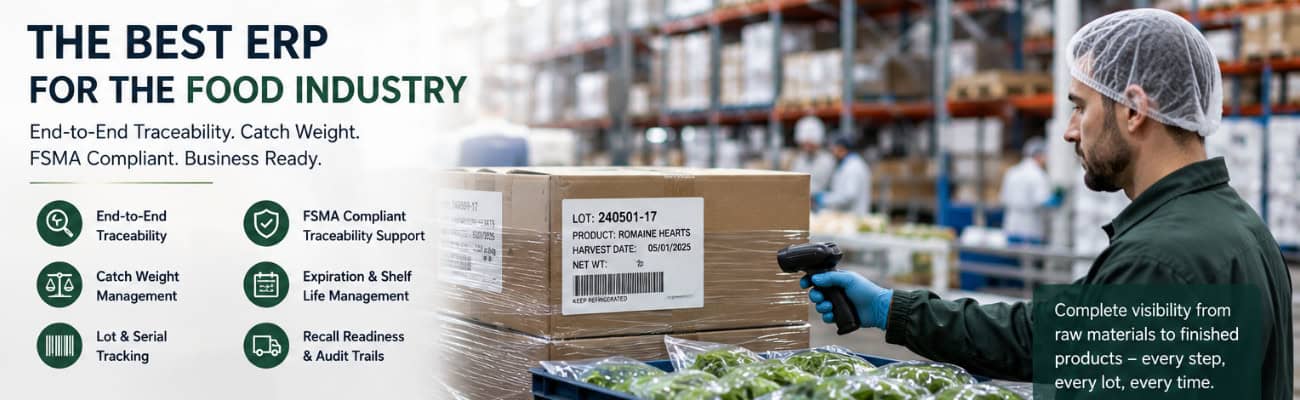
Lot and batch tracking. Every lot needs to be traceable from the supplier it came from, through receiving, production, storage, and shipping, all the way to the customer it ultimately reached — in both directions. If you can’t run that lookup in minutes, you don’t have traceability. You have data.
Expiration and best-use-date visibility. For perishable inventory, date tracking isn’t just a compliance checkbox — it drives real daily decisions about what ships first, what gets marked down, and what gets pulled. That visibility needs to be live, not reconciled at month-end.
Catch weight support. Meat, poultry, seafood, cheese, and other variable-weight products don’t fit neatly into fixed-unit inventory systems. A case might be sold by the unit but invoiced by actual weight, and that weight varies case to case. Without native catch weight handling, the gap between your inventory system and your invoicing becomes a manual reconciliation problem — one of the most common sources of margin leakage and billing disputes in food distribution.
A complete, automatic audit trail. Every inventory movement — who touched it, when, and what changed — needs to be logged automatically by the system, not entered manually by staff. That automatic record is what actually answers a recall question or an auditor’s request, rather than depending on someone’s recollection of what happened three weeks ago.
Real-time visibility from receiving through shipment. Lot numbers, expiration dates, and catch weights are only useful if they update in real time across the whole business. If your warehouse team, production floor, and finance team are each looking at data from a different system, the traceability record has already broken before anyone asks for it.
Why Spreadsheets and QuickBooks Fall Short
None of this is a knock on QuickBooks — it does what it was built to do, which is accounting. But QuickBooks has no native concept of lot tracking, catch weight, or expiration dates. That’s why so many food companies end up running QuickBooks alongside spreadsheets plus a separate inventory tool, manually reconciling all three.
The problem with that patchwork isn’t that any one piece fails on its own. It’s that no single system has the complete picture — and a complete picture is exactly what traceability requires. For more on when that setup stops being sustainable, see our full breakdown in QuickBooks vs. ERP: When Accounting Software Isn’t Enough.
What to Look for in an ERP for Food and Beverage Companies
If you’re evaluating ERP systems specifically because of lot tracking, catch weight, or traceability requirements, a few pointed questions will tell you quickly whether a system was built for food operations or bolted on after the fact:
• Does lot tracking work natively across every module — inventory, production, and shipping — or only in one place?
• Can the system handle catch weight items without a manual workaround or a third-party add-on?
• Is the audit trail logged automatically by the system, or does it depend on staff remembering to record changes?
• Can you produce a full lot history — supplier to customer — in minutes, not hours?
• Does the vendor have actual food and beverage clients, or is food listed as a supported industry without a real track record behind it?
How Kechie Approaches Food and Beverage Operations
Kechie’s inventory and warehouse management system was built around these requirements from the ground up — not configured for them after the fact.
Lot tracking with expiration and best-use-date filtering, native catch weight support for variable-weight items, serialized inventory tracking, and a complete audit trail logging user, timestamp, and before-and-after values on every transaction are all part of Kechie’s core modules — not separate add-ons you pay for later. Because Kechie runs on a single database, that information is visible in real time across receiving, production, warehousing, and shipping. A lot lookup or a recall response pulls from one place instead of three.
Kechie is recognized as a Forbes Top 10 ERP for 2025 and is used by food and beverage operations — including distribution organizations managing perishable goods at scale — that need the operational foundation traceability requirements are built on.
To be direct about what this does and doesn’t mean: no ERP vendor can certify your business as FSMA 204 compliant. That depends on your written Traceability Plan, your internal procedures, and your supply chain partners — not your software alone. What a system like Kechie provides is the ability to capture the right data at the right points and produce it quickly when it’s asked for, whether the ask comes from the FDA, an internal auditor, or a retail buyer’s compliance team. For more on how Kechie compares to the major alternatives, see our ERP comparison overview.
Implementation Reality for Food and Beverage Companies
Food and beverage operations don’t have the luxury of a long, disruptive rollout. Perishable inventory and live production schedules don’t pause for a software project.
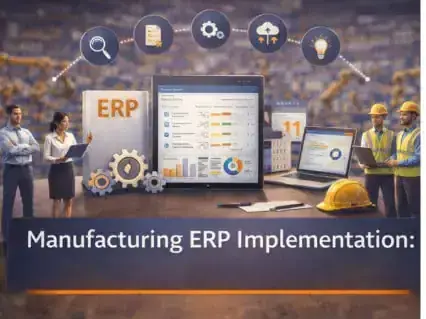
Kechie implementations are handled directly by the Kechie team — not handed off to a third-party VAR — and typically go live in weeks rather than months. Onboarding includes sandbox access for hands-on training before go-live, so your team works in the actual system on your actual workflows before the cutover happens. If your operation runs production in addition to distribution, our manufacturing ERP implementation guide covers the process mapping and data migration steps in depth.
Kechie serves food and beverage companies from roughly $1M to $100M+ in revenue — businesses that have outgrown spreadsheets and accounting software but don’t need (or want to pay for) enterprise-scale complexity. For context on where Kechie fits against larger systems like NetSuite or SAP, see our cloud ERP for distribution guide.
Frequently Asked Questions
What is food traceability software?
Food traceability software tracks inventory by lot or batch from receipt through production and shipment, so a company can quickly identify where a specific lot came from, where it went, and what happened to it along the way. The strongest implementations do this inside a single integrated system — not across separate tools that have to be manually reconciled.
What should an ERP track for food and beverage companies specifically?
At minimum: lot and batch numbers, expiration and best-use dates, catch weight for variable-weight items, and a complete audit trail of inventory movement. These need to update in real time and stay connected across receiving, production, warehousing, and shipping.
What is FSMA Section 204?
FSMA Section 204 is the FDA’s Food Traceability Rule, which requires companies that manufacture, process, pack, or hold certain high-risk foods to maintain detailed traceability records and produce them to the FDA within 24 hours of a request. The compliance deadline was extended to July 20, 2028. However, many major retailers and foodservice distributors are already enforcing their own traceability requirements on suppliers independent of the federal timeline.
Does QuickBooks support lot tracking and catch weight?
No. QuickBooks is accounting software and has no native lot tracking, expiration date management, or catch weight functionality. Companies that need these capabilities typically run QuickBooks alongside separate inventory tools and spreadsheets — which creates reconciliation gaps rather than a single source of truth.
What is catch weight, and why does it matter for ERP selection?
Catch weight refers to products — common in meat, poultry, seafood, and cheese — that are sold by the unit but invoiced based on actual variable weight. An ERP without native catch weight support forces manual reconciliation between inventory counts and invoicing, which is a common source of billing errors and margin loss in food distribution.
How long does it take to implement an ERP with traceability features?
It depends heavily on the vendor and how the system is architected. Implementations that route through third-party consultants and require building traceability functionality on top of a generic system often take three to six months or longer. Kechie implementations, handled directly by the team that built the system, typically go live in weeks.
Does an ERP make a company FSMA 204 compliant?
Not on its own. FSMA 204 compliance depends on a company’s written Traceability Plan, internal procedures, and coordination with supply chain partners — software alone can’t satisfy that. What the right ERP provides is the data infrastructure those requirements depend on: fast, accurate lot lookups and a complete audit trail, produced from real operations rather than reconstructed after the fact.
If you’re earlier in the process and want the broader case for why traceability matters before getting into system evaluation, see Why ERP and Traceability Matter in the Food & Beverage Industry. For more on how Kechie supports food and beverage operations specifically, visit the Kechie Food Services page.
➤ Ready to see how Kechie handles lot tracking, catch weight, and traceability for your operation? Schedule your free Kechie ERP demo.
The Best ERP Solutions for Nonprofits in 2026
| ERP System | Best For | Lot Tracking & Expiration Dates | Item Variants (Size/Color) | Ready Out of the Box | Typical Implementation |
|---|---|---|---|---|---|
Kechie |
Nonprofits with real inventory complexity |
Native |
Native |
Yes |
Weeks |
| NetSuite | Large nonprofits, complex fund accounting | Requires build-out | Requires build-out | No — needs configuration | 6–12+ months |
| Sage Intacct | Nonprofit financial management | Not applicable (financial tool) | Not applicable | Yes, for finance only | Weeks to months |
| Odoo | Tech-savvy teams, tight budgets | Requires build-out | Requires build-out | No — needs development | Months (varies) |
| Dynamics 365 | Microsoft-embedded organizations | Requires build-out | Requires build-out | No — needs configuration | 6–12+ months |
1. Kechie ERP by My Office Apps — Best Overall for Nonprofits
Kechie is a cloud-based ERP system purpose-configured for the operational complexity that nonprofits actually face. It is the only solution on this list with a direct track record of supporting mission-driven organizations managing real inventory at scale — from food distribution to multi-site program operations.
Meals on Wheels San Francisco uses Kechie to manage procurement, inventory, preparation, and distribution of up to 30,000 fresh meals daily to homebound seniors. New Life Centers, which serves youth and families across multiple sites, relies on Kechie to manage operations across its programs. These are not pilot deployments — they are production operations running on Kechie every day.
Inventory built for nonprofit complexity.
Kechie’s inventory management handles the full range of what nonprofits actually manage. Lot tracking and expiration date management are native to the system — every food item, medical supply, or regulated product can be tracked from receipt through distribution with full traceability. FIFO rotation is enforced automatically. Item variants support multi-dimensional attributes, so clothing programs can manage size, gender, and color without creating an unmanageable SKU explosion. Consumable inventory is tracked through a dedicated consumption model that records what was used, by whom, where, and when.
Multi-location management gives operations teams a real-time top-down view of every site simultaneously, with the ability to transfer inventory between locations, run location-specific reports, and manage site-level procurement independently.
Vendor and partner connectivity.
Kechie’s SupplierHub gives vendors and suppliers direct access to purchase orders, order confirmations, and delivery updates through a dedicated portal — eliminating the back-and-forth emails and phone calls that consume staff time and introduce errors. For nonprofits managing relationships with multiple food suppliers, product vendors, or service partners, this is a significant operational improvement.
The Kechie B2B portal extends that connectivity to partner organizations. New Life Centers, which provides education, mentorship, and family support services across Chicago, used Kechie to build a portal connecting them with the network of community-based organizations they work with — including food banks and pantries, shelters, churches, schools, and other nonprofits that either receive donations from New Life Centers or provide donations into its network. Partner organizations can now view available inventory in real time, instead of relying on phone calls and emails to coordinate distributions. “It’s a game-changer for us,” the organization shared. “Now, our partner organizations can view available inventory in real-time, making it easier to meet the needs of families and individuals quickly. Before, we struggled to coordinate with other nonprofits; now, we’re all on the same page.”
Partner network growth at New Life Centers Using Kechie’s B2B portal, New Life Centers grew its partner network from 27 nonprofit organizations to over 150 in a single year — a scale of collaboration that would be unmanageable without a connected system.
Lot tracking serves another nonprofit-specific purpose as well: separating donated items from purchased items. New Life Centers uses Kechie’s lot tracking functionality to keep clear, auditable records distinguishing what was donated from what was purchased — a distinction that matters for accurate reporting to funders and boards.
Flexible and configured to your needs.
What sets Kechie apart from enterprise ERP systems is not just what it does — it is how it is delivered. Kechie is highly configurable to specific workflows without requiring developers or IT staff. The system adapts to how your organization actually operates, not the other way around.
“When I first heard of Kechie and we did the demo, I thought for sure right away like, this is it,” said Connie Marquez of New Life Centers. “It felt like it had all the bells and whistles of what our organization needed.”
Kechie is implemented and supported by a team that stays hands-on long after go-live — one that understands your mission and is committed to configuring the system around it as your needs evolve.
My Office Apps offers nonprofit discounts and contributes implementation time for qualifying organizations. Pricing is user-based and predictable — no consumption variables, no per-module surcharges, no surprise fees.
The system comes pre-configured out of the box with hundreds of ready-to-run reports. Integrations include QuickBooks, ShipStation, CardConnect, US Foods, and EBizCharge.
Best for: Nonprofits managing food distribution, clothing programs, multi-site operations, or any organization dealing with real inventory complexity. Serves organizations from $1M to $100M+ in annual operating budgets.
Awards: Forbes Advisor Top 10 ERP Systems of 2025, Capterra Best Ease of Use 2025, Software Advice FrontRunners 2025, GetApp Category Leaders 2025.
2. NetSuite ERP — Best for Large, Complex Nonprofits
NetSuite offers a nonprofit edition with strong fund accounting, grant management, and financial reporting capabilities. It is one of the most widely deployed cloud ERP systems in the world and integrates with a broad ecosystem of third-party tools.
For smaller nonprofits, the tradeoffs are significant. NetSuite is a platform, not a ready-to-use system — it requires substantial configuration and build-out before it reflects how your organization actually operates, representing a substantial investment and additional costs. Licensing is consumption-based and scales with users, modules, and transaction volume. Until the build-out is complete, the system isn’t usable for day-to-day operations, which means a long runway before any value is realized.
Best for: Large nonprofits with complex fund accounting needs, dedicated IT staff, and budgets to support enterprise-level implementation and ongoing costs.
3. Sage Intacct — Best for Nonprofit Financial Management
Sage Intacct is purpose-built for nonprofit financial management, with strong fund accounting, grant tracking, and FASB-compliant reporting. For finance teams that need sophisticated accounting capabilities, it is one of the best options available.
Where it falls short is operational breadth. Sage Intacct is primarily a financial tool. Nonprofits managing inventory, procurement, multi-location operations, or vendor networks will need to integrate additional systems — adding cost, complexity, and data synchronization challenges.
Best for: Nonprofits whose primary need is sophisticated fund accounting and financial compliance reporting, with limited inventory or operational management requirements.
4. Odoo — Best for Tech-Savvy Nonprofits on a Tight Budget
Odoo is an open-source ERP system with a modular structure and one of the lowest price points in the market. It covers a wide range of operational functions and can be configured extensively for nonprofit workflows.
The significant caveat is that Odoo is a framework, not a ready-to-use system. Getting it configured into something that actually runs a nonprofit’s operations requires real development work — either in-house or through an implementation partner — before the system can be used day to day. For nonprofits without IT resources, that build-out is a substantial barrier before any value is realized, and ongoing maintenance remains an ongoing technical responsibility.
Best for: Tech-savvy nonprofits with access to development resources who want maximum flexibility at minimum licensing cost.
5. Microsoft Dynamics 365 Business Central — Best for Microsoft-Embedded Organizations
Dynamics 365 Business Central is Microsoft’s mid-market ERP solution. For nonprofits already deeply embedded in the Microsoft ecosystem — Teams, SharePoint, Outlook, Azure — it offers natural integration and a familiar interface for staff.
Like NetSuite, Dynamics 365 is a platform that needs to be built out before it’s usable — it is not purpose-built for nonprofits and lacks native nonprofit-specific features out of the box. Inventory complexity like lot tracking, expiration dates, and item variants all require additional configuration work before the system reflects a nonprofit’s actual operations, and total cost of ownership is high as a result.
Best for: Nonprofits with existing Microsoft infrastructure, access to Dynamics implementation partners, and the budget to support an enterprise-level deployment.
How to Choose the Right ERP for Your Nonprofit
What types of inventory do you manage? If your organization handles food, medical supplies, clothing, or any items requiring lot tracking, expiration date management, or variant tracking, make sure those capabilities are native — not add-ons or workarounds.
How many locations do you operate? Multi-site organizations need real-time cross-location visibility and the ability to manage inventory transfers and site-level reporting from a single system.
How do you work with vendors and partner organizations? If managing supplier relationships and partner order requests is taking significant staff time, look for a system with portal connectivity that lets vendors and partners interact directly with the system.
How configurable does it need to be? Every nonprofit is different. The system should adapt to your workflows, approval processes, and reporting requirements — not force you to adapt to it.
What does your IT capacity look like? If you don’t have a dedicated IT team, prioritize a system that’s ready to use out of the box rather than a platform that needs to be built out and configured from the ground up before it’s functional.
What is your realistic total cost of ownership? Look beyond the subscription price. Factor in build-out and configuration time, training, add-on modules, and ongoing support. A system that’s ready to use out of the box may cost significantly less over three years than a platform with a lower headline price that requires months of build-out before it’s operational.
Why Nonprofits Choose Kechie
Nonprofits choose Kechie because it is the rare system that matches their operational reality — and backs it up with a team that actually shows up.
The inventory capability handles what nonprofits actually manage: perishable food with lot tracking and expiration dates, clothing with size and color variants, consumables, donated goods, and program materials across multiple sites. The vendor and partner portals reduce the manual coordination burden that consumes staff time. The system is flexible enough to be configured to each organization’s specific workflows without requiring IT expertise or customization budgets.
And when something needs to change — because nonprofit operations always evolve — Kechie’s team is there, understanding the mission and invested in the organization’s success, not handing the system off and disappearing after go-live.
As Connie Marquez of New Life Centers said: “Flexibility, ease of use, and support provided are unmatched. As a non-profit with limited resources, this makes a huge difference.”
Frequently Asked Questions
What is the best ERP software for nonprofits? Kechie ERP by My Office Apps is the best overall ERP solution for nonprofits managing real operational complexity — food distribution with lot tracking and expiration dates, clothing programs with item variants, multi-site operations, or vendor and partner networks. For large nonprofits with complex fund accounting needs, NetSuite or Sage Intacct may also be worth evaluating.
Do nonprofits need ERP software? Nonprofits managing physical inventory, multiple locations, or complex procurement relationships will benefit significantly from a full ERP system. Organizations primarily managing finances can often get by with accounting software, but once operational complexity grows — especially around inventory, lot tracking, or multi-site distribution — accounting tools hit a ceiling quickly.
Can nonprofit ERP software handle lot tracking and expiration dates? Yes — but not all systems do this equally well. Kechie ERP includes native lot tracking, expiration date management, and FIFO rotation enforcement, making it a strong fit for food banks, meal programs, and any nonprofit managing perishable or regulated items.
Can nonprofit ERP software manage clothing with size and color variations? Yes. Kechie supports multi-dimensional item variants — size, gender, color, or any combination of attributes — so clothing and apparel programs can manage their full inventory without creating an unmanageable number of separate SKUs.
How much does nonprofit ERP software cost? Costs vary widely. Enterprise solutions like NetSuite can run into the tens of thousands of dollars or more to implement, with ongoing consumption-based licensing. Kechie offers predictable per-user pricing with no consumption variables or hidden fees, and My Office Apps offers nonprofit discounts and contributes implementation time for qualifying organizations.
How long does it take to implement ERP software for a nonprofit? Kechie implementations are typically completed in weeks, with hands-on support from the Kechie team throughout the process — because the system is ready to use out of the box and configuration is the focus, not custom development. Other enterprise platforms may take months to implement.
What is a B2B portal for nonprofits? A B2B portal allows partner organizations to view inventory and coordinate distributions directly through a secure online portal, instead of relying on phone calls and emails. New Life Centers uses Kechie’s B2B portal to connect with the network of nonprofits, shelters, food banks, and other community organizations it works with — both those receiving donations and those providing them — and grew that partner network from 27 organizations to over 150 in a single year.
What is a SupplierHub for nonprofits? Kechie’s SupplierHub gives vendors and suppliers direct access to purchase orders, order confirmations, and delivery status updates through a dedicated portal. Rather than coordinating everything through email and phone calls, suppliers can log in and manage their side of the relationship directly — saving staff time and reducing errors.
Ready to See Kechie in Action?
If your nonprofit is managing food distribution, clothing programs, multi-site operations, or complex vendor and partner relationships — and you’re ready to replace spreadsheets and disconnected systems with something built for your real operational needs — Kechie ERP was designed for organizations like yours.
Schedule a Free Demo and see firsthand how Kechie can help your team do more with less.
Schedule a Free Demo Today!
See how Kechie ERP can transform your business, save you time, money, and aggravation. Click the button below to schedule your free demo.
Schedule Your Kechie Demo Now!In This Article
-Why Traceability Pressure Is Rising Now
-What Traceability-Ready Food Operations Actually Need
-Why Spreadsheets and QuickBooks Fall Short
-What to Look for in an ERP for Food and Beverage Companies
-How Kechie Approaches Food and Beverage Operations
-Implementation Reality for Food and Beverage Companies
-FAQs