

5 Ways AI is Changing our World for the Better
5 Ways AI is Changing our World for the Better
Man has long feared the rise of the machine – his own creation becoming smarter and more intelligent than he. But while artificial intelligence and machine learning are rapidly changing our world and powering the Fourth Industrial Revolution, humanity does not need to be afraid.

Creating New Jobs
“Artificial intelligence will change the workforce,” affirms Carolyn Frantz, Microsoft’s Corporate Secretary. The bleak view of AI as a job killer is but one side of the coin: while 75 million jobs may disappear, as many as 133 million more engaging, less repetitive new roles are expected to be created. AI “is an opportunity for workers to focus on the parts of their jobs that may also be the most satisfying to them,” says Frantz.
Bridging Language Divides
Whether it’s teaching new languages in a personalized way or translating speech and text in real-time, AI-powered language tools from Duo lingo to Skype are bridging social and cultural divides in our workplaces, classrooms and everyday lives. Digital translation services are not “perfect,” admits Microsoft education leader Mark Sparvell, but “they offer a means of understanding” that might not otherwise be possible.
Transforming Government
Less paperwork, quicker responses, a more efficient bureaucracy – AI has the power to drastically change public administration, but are governments ready? This tech comes with both risks and opportunities that need to be understood and evaluated. Academic Kevin Desouza believes gamification and role-playing could be the key to public servants analyzing complex cases, coming up with better solutions, and truly understanding the future of autonomous systems.
Delivering Health Care
AI has the potential to make health care “much more accessible and more affordable,” insists Paul Bates, director of NHS services at Babylon Health. Babylon, an app that offers symptom checking and fast access to physicians if needed, is providing advice to more than one million residents in central London through an AI-powered chatbot. Patients can get an accurate, safe, and convenient answer in seconds – and save health care providers’ money too.
Creating Art
Computational creativity is drastically changing the nature of art. Software, more than a tool, is becoming a creative collaborator, merging computer scientist with artist. As Austrian artist Sonja Bäumel assures, “The exhibition space becomes a lab; art becomes an expression of science, and the artist is the researcher.”
Rey, M., (2019, June 25). 5 Ways AI is Changing Our World for the Better. Retrieved from https://www.salzburgglobal.org/news/latest-news/article/5-ways-ai-is-changing-our-world-for-the-better.html
About My Office Apps, Inc.
My Office Apps, Inc. (MOA) is a leader in business improvement software solutions to automate your organization. Building on three decades of software design and development, MOA delivers Kechie™, a transformative business tool. Kechie is a fully integrated Enterprise Resource Planning Software as a Service (SaaS) platform with a simplified user experience and the latest in cloud technology. It is quick and easy to implement without the expensive price tag. Sold in separate packages – inventory and warehouse management (CRM, Sales, Procurement, Logistics included), manufacturing, finance – or a fully configured ERP system to include all of these individual tools. Kechie is easily configured to the scalable needs of your growing business. For more information on managing your business processes more efficiently and effectively, visit www.kechie.com or www.myofficeapps.com.
###

Access Control Systems: The Power to Secure what’s Yours
Access Control Systems: The Power to Secure what’s Yours
A critical element in securing your business is controlling access to your business space. While cyber security tends to be top of mind for many businesses, controlling who enters – or has access to your business – is the first line of defense against intruders, thieves and even potential employee misconduct. Choosing access control systems wisely protects your staff, your stuff and your data.
What is an Access Control System?
Access control is a way of limiting access to a system, either physically or virtually, and users must present credentials before they can be granted access. In brief, access control is used to identify an individual who does a specific job, authenticate them, and then proceed to give that individual only the key to the door, the workstation, or the software tools they need access to and nothing more. Access control systems come in three variations:
- Discretionary Access Control (DAC): This is the least stringent form as it provides one level of access for all with approved credentials.
- Mandatory Access Control (MAC): This is the strictest and most work-intensive form of access control as it requires the system administrator to assign an access level to each individual added to the system.
- Role Based Access Control (RBAC): This is the most common form. With this approach, roles or job titles are added to the system with a level of access assigned to each, based on the access needs someone in that role will have. When a new person is added to the system, they are added with a given role or job title and the level of access is automatically assigned. This is also called rules-based access.
Cloud-Based Access Control
Access control in the cloud started with small business end users because it made sense. Offering them a way to get many of the same features larger enterprises enjoyed while not requiring the same infrastructure was a natural fit. The main benefit of cloud-based access control is that these systems are much easier to manage and maintain than traditional access control systems. You never have to worry about losing important information if/when your system crashes. Also, upgrades or new features can be applied automatically and seamlessly, with no need for site visits by technicians. With a cloud-based physical access control system, your cloud environment is a trusted and compliant environment that always provides you with full control, governance, and ownership of your data.
As you can see, when it comes to choosing the type of access control system that is most suitable for your organization, there are a number of factors involved. Some of those factors include the nature of your business, security procedures within the organization, and the number of users on the system. Kechie™ ERP offers complete and customizable access control tools that are as unique as your business. For more information on managing your business processes with role based access control, visit www.myofficeapps.com.
About My Office Apps, Inc.
My Office Apps, Inc. (MOA) is a leader in business improvement software solutions to automate your organization. Building on three decades of software design and development, MOA delivers Kechie™, a transformative business tool. Kechie is a fully integrated Enterprise Resource Planning Software as a Service (SaaS) platform with a simplified user experience and the latest in cloud technology. It is quick and easy to implement without the expensive price tag. Sold in separate packages – inventory and warehouse management, manufacturing, finance – or a fully configured ERP system to include all of these individual tools. Kechie is easily configured to the scalable needs of your growing business. For more information on managing your business processes more efficiently and effectively, visit www.myofficeapps.com.
###
What is Vendor Managed Inventory? How to Make VMI Work
What is Vendor Managed Inventory? How to Make VMI Work
Looking to streamline your supply chain and reduce inventory costs? You might want to look into Vendor-Managed Inventory (VMI). A VMI software might be the solution – as long as you know the best practices to make it work. So, what is VMI, and what is the impact on your business?
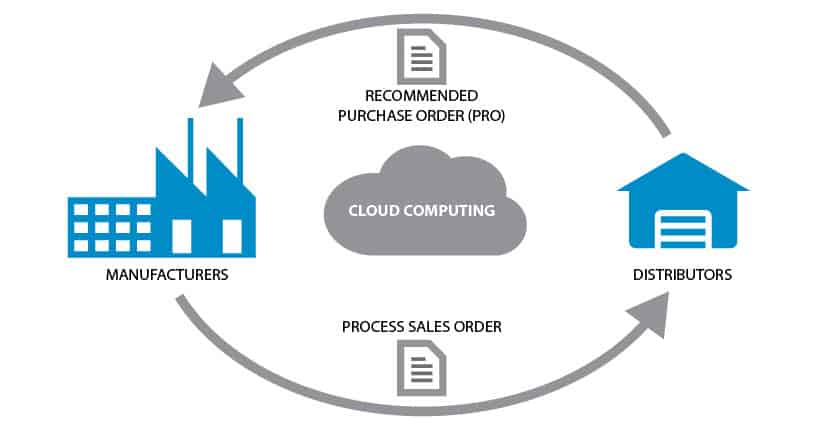
Vendor Managed Inventory is a business arrangement where the vendor of a product takes responsibility for making sure the buyer has the agreed inventory. The supplier or vendor ensures the stock is replenished automatically without the buyer’s initiation. If done right, VMI is a win-win situation for both the vendor and the customer.
What benefits can VMI bring to your business?
- VMI helps cut operating costs – With the supplier handling the quantity and frequency of orders, you can reduce costs associated with personnel and space.
- Lean inventory levels – VMI allows your vendors to supply in-demand goods at the right time. This also removes the need for safety stock.
- Improved Efficiency – The speed of stock replenishment is improved, and the risk of running out of stock is reduced. This improved service trickles down to the end-users.
What are the benefits of VMI for the Manufacturer/Supplier?
- Forecasting is easier courtesy of access to the buyer’s Point of Sale data.
- An optimized VMI program ensures you supply what is needed, and at the right time. Visibility to inventory levels helps the manufacturer ascertain the need for a product before it’s ordered.
- Produces a predictable and steady flow of income while mitigating the risk of losing the customer to a competitor.
- VMI reduces ordering errors and helps the supplier schedule operations productively
- A VMI program facilitates a stronger Customer-Supplier relationship. Both parties must work closely together to ensure seamless inventory management activities.
Cons of VMI
Regardless of the benefits highlighted above, enforcing a VMI program has a few drawbacks that business owners should keep in mind. One of the main disadvantages of VMI is its impact on sourcing. It’s difficult for supply chain managers to consider re-sourcing when the current VMI program is well-run. Some managers might be compelled to compromise supplier-related issues such as higher prices due to over-reliance on a vendor.
Granting non-employees full access to your inventory data is a significant risk. Leaving your stocking needs to the mercy of a 3rd party makes your business vulnerable to errors by the supplier, and even sabotage from competitors.
3 Steps to a Successful VMI Program
- Clarify expectations – and make them realistic: How will the system impact the supplier and the company? Both parties should be engaged in honest discussions to ensure everyone understands the risks and returns of the arrangement.
- Share information seamlessly: The success of a VMI program rests on the quality of information shared between the two parties. The supplier/manufacturer must have full visibility into the inventory levels to ensure a steady flow of goods.
- Clear and open communication: Constant and open communication is vital to the sustainability of the VMI business model. This includes discussing goals and progress towards achieving them. Each side must prevent a breakdown in communication, especially when miscues arise.
To make the best of vendor managed inventory, it's important to utilize a complete inventory management solution to carry out all of the necessary steps on your behalf. Without insights into your inventory, it's difficult to have automatic replenishment of vendor-managed inventory and timely invoicing. That's why it's important to utilize an inventory management solution like Kechie software, which allows you to set up, and streamline your VMI, to maintain automated operations between the vendor and all of the tracked inventory.
