QuickBooks vs ERP: When Accounting Software Isn’t Enough (2026)

QuickBooks runs the accounting for millions of small businesses. It handles invoicing, expense tracking, and basic financial reporting well. But at some point, usually when you are managing multiple warehouses, thousands of SKUs, complex purchase orders, or a manufacturing process, QuickBooks stops being the tool that runs your business and becomes the tool you work around. The spreadsheets multiply. The manual processes stack up. And the workarounds your team builds to compensate for what QuickBooks cannot do start costing more in time and errors than the software saves.
If you are comparing QuickBooks vs ERP for your growing business, you are likely at an inflection point. This guide breaks down the real differences between accounting software and enterprise resource planning software, explains exactly when it makes sense to upgrade, and walks you through how to choose the right platform.
Is QuickBooks an ERP System?
No. QuickBooks is accounting software, not an ERP system. This distinction matters because it defines the ceiling of what QuickBooks can do for your business. QuickBooks handles financial transactions: invoicing, bill payment, payroll, bank reconciliation, and tax preparation. It does these things well for small businesses that primarily need to track money in and money out.
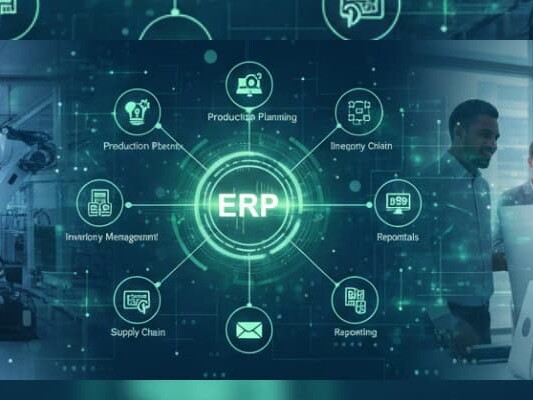
An ERP (Enterprise Resource Planning) system manages the entire operation: inventory across multiple warehouses, manufacturing with material requirements planning, order processing from quote to shipment, procurement, customer relationship management, warehouse workflows with barcode scanning, and financials, all in a single integrated platform where data flows in real time between every function.
The advantages of ERP over QuickBooks for operations become clear the moment your business outgrows basic accounting needs. When asking what an ERP can do that QuickBooks cannot, the answer covers nearly every operational function outside of core accounting.
QuickBooks sits in the accounting department. An ERP runs the whole business.
QuickBooks vs ERP: Key Differences Between Accounting Software and Enterprise Resource Planning Software
| Capability | QuickBooks (Accounting Software) | ERP System |
| Functional Scope | Accounting, invoicing, payroll, basic reporting | Accounting + inventory, WMS, manufacturing, CRM, procurement, logistics |
| Inventory Tracking | Basic item tracking, no lot/serial, no multi-warehouse | Real-time multi-warehouse, lot tracking, serialization, barcode scanning, cycle counting |
| Manufacturing | None | MRP, BOM management, work orders, production scheduling |
| Scalability | Designed for small teams (<25 users) | Scales from 15 to 250+ users across departments |
| Data Integration | Siloed; requires third-party apps to connect | Single database; all modules share real-time data |
| Cost & Complexity | Low entry cost, quick setup | Higher investment, broader ROI across operations |
| Reporting & Visibility | Financial reports only | Operational + financial dashboards, real-time KPIs |
| Audit & Compliance | Basic audit trail | Full audit trail, role-based access, regulatory compliance |
| Workflow Automation | Limited to accounting workflows | Cross-functional automation: order-to-cash, procure-to-pay, pick-pack-ship |
| CRM | None (requires separate tool) | Integrated CRM connected to orders, inventory, and financials |
| Industry Adaptability | General accounting for any business | Configurable for distribution, manufacturing, 3PL, food & bev, healthcare |
| Integration Framework | App marketplace (varying quality) | Native integrations with ecommerce, shipping, EDI, payment processors |
8 Key Differences Between ERP and QuickBooks
1. Scope: Accounting vs. Entire Operation
QuickBooks manages money. An ERP manages money, inventory, orders, manufacturing, customers, and warehouse operations in one system. The difference is not just feature count; it is whether your software can answer operational questions (what is in stock, what is allocated, what is the margin on this customer) without pulling data from three different places.
2. Scalability: 5-Person Team vs. 250-Person Organization
QuickBooks was designed for small businesses. As your operation grows past 20 to 25 users, multiple warehouses, or complex order flows, QuickBooks requires workarounds that multiply with scale. An ERP is built to handle growing transaction volumes, more users, and increasing operational complexity without collapsing under its own weight.
3. Data Integration: Silos vs. Single Source of Truth
With QuickBooks, your inventory is in one system, orders in another, CRM in a third, and shipping in a fourth. None of them talk to each other in real time. You spend hours reconciling discrepancies. An ERP runs on a single database where every transaction, from a sales order to a warehouse pick to an invoice, updates in real time across every module.
4. Inventory Management: Basic Tracking vs. Warehouse-Grade Control
QuickBooks tracks what you bought and sold. An ERP tracks where every item sits in which warehouse, which bin, which lot, with serial numbers, expiration dates, and real-time quantities. If you manage more than a few hundred SKUs across any physical space, the gap between QuickBooks and ERP inventory management is the gap between guessing and knowing. This is especially relevant when comparing QuickBooks vs ERP for distributors who depend on inventory accuracy.
5. Manufacturing: Nonexistent vs. Built-In MRP
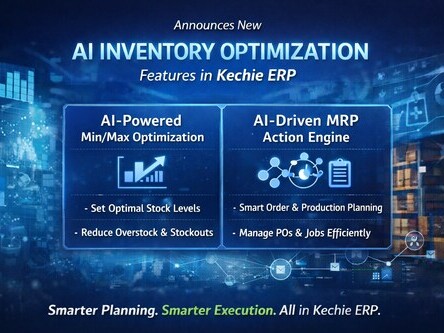
QuickBooks has no manufacturing capability. If you are a manufacturer running QuickBooks, you are managing production in spreadsheets, whiteboards, or separate tools. An ERP with Material Requirements Planning calculates what materials you need, when you need them, and generates purchase orders and production schedules from real-time demand data. This alone answers the question: is QuickBooks or an ERP better for a manufacturing company? It is not close.
6. Cost Structure: Low Entry vs. Broader ROI
QuickBooks costs less to start. That is not debatable. But the total cost of running your business on QuickBooks plus spreadsheets plus bolt-on inventory apps plus manual workarounds plus the errors those workarounds create often exceeds the cost of a properly implemented cloud ERP. The comparison is not QuickBooks subscription vs. ERP subscription. It is the full cost of operating with disconnected systems vs. the cost of operating on an integrated one.
7. Reporting: Backward-Looking Financials vs. Real-Time Operational Dashboards
QuickBooks reporting is financial and backward-looking. It tells you what happened last month. An ERP provides real-time dashboards that tell you what is happening now: inventory levels, open orders, fulfillment rates, production status, and margin by customer. Controllers and operations managers can make decisions based on current data rather than last month’s exports.
8. Workflow Automation: Manual Processes vs. Cross-Functional Automation
QuickBooks automates invoicing and bill reminders. An ERP automates entire workflows: order-to-cash (quote, order, pick, pack, ship, invoice, payment), procure-to-pay (requisition, PO, receive, inspect, pay), and manufacturing execution (demand, plan, schedule, produce, quality check). Each automated workflow eliminates manual handoffs where errors occur.
Key Areas Where ERP Outshines QuickBooks
For Manufacturers
QuickBooks cannot manage a bill of materials, schedule production, calculate material requirements, or track work orders. If you are a manufacturer, you are running production outside your accounting software by definition. An ERP with integrated MRP connects demand forecasting to material planning to production scheduling to inventory, eliminating the spreadsheets and manual handoffs that create waste and delays. For manufacturers asking whether QuickBooks or ERP is the better fit, the answer is clear once production complexity exceeds a few basic assemblies.
For Distributors
Distributors live and die by inventory accuracy, order fulfillment speed, and margin visibility. QuickBooks provides none of these at the level a distribution operation requires. An ERP gives you real-time inventory across multiple warehouses, barcode-driven receiving and shipping, lot tracking for compliance, automated reorder points, and margin-by-customer reporting that QuickBooks simply cannot deliver. When choosing between QuickBooks vs ERP for distributors, the breakpoint is usually when inventory errors or fulfillment delays start costing you customers.
Multi-Location Operations
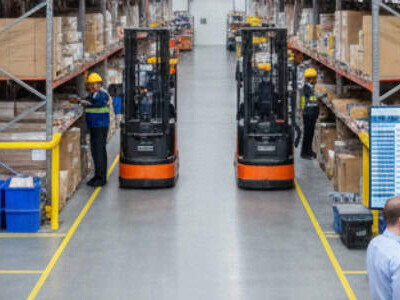
QuickBooks was built for single-location businesses. The moment you have inventory in two or more locations, you need real-time visibility into what is where. An ERP provides multi-warehouse management with transfer orders, location-specific stock levels, and consolidated reporting without manual spreadsheet merges.
Compliance and Traceability
Industries like food & beverage, healthcare, and regulated manufacturing require lot traceability, expiration date tracking, and audit trails that QuickBooks cannot provide. An ERP with native lot tracking and serialization keeps you compliant and audit-ready without maintaining separate tracking systems.
Cross-Departmental Visibility
When sales cannot see inventory, purchasing cannot see demand, and finance cannot see real-time costs, decisions happen in silos. An ERP gives every department access to the same real-time data, eliminating the information gaps that cause over-ordering, stockouts, missed shipments, and margin erosion.
When to Upgrade from QuickBooks to an ERP System
Not every business needs an ERP. QuickBooks is the right tool for businesses with simple operations, small teams, and straightforward accounting needs. But there are specific signals that indicate you have outgrown it.
Your Workarounds Outnumber Your Workflows
If your team maintains more spreadsheets, manual trackers, and bolt-on apps than actual QuickBooks workflows, the system is no longer serving you. At some point, the complexity of managing the workarounds exceeds the complexity of implementing an ERP.
Inventory Accuracy Is Declining
When physical counts consistently diverge from system records, when customers receive wrong items, or when you cannot confidently tell a customer whether something is in stock, QuickBooks has hit its inventory ceiling.
You Manage Multiple Warehouses or Locations
QuickBooks does not handle multi-warehouse inventory natively. If you are using location codes, sub-accounts, or external tools to track stock across multiple sites, you need a platform designed for multi-location operations.
You Are Manufacturing Anything
If you manage bills of materials, production scheduling, or material requirements in any form, you need MRP. QuickBooks does not have it and cannot simulate it. This is the clearest upgrade trigger.
QuickBooks Desktop End-of-Life Is Forcing a Decision
Intuit is phasing out QuickBooks Desktop, pushing users toward QuickBooks Online, which is cloud-based but even more limited for inventory, manufacturing, and multi-entity operations. If you are facing this forced migration, the smart question is: should I upgrade from QuickBooks to ERP or QuickBooks Enterprise? Moving to QuickBooks Online is a lateral step. Moving to an ERP is a permanent solution.
Scaling Without Proportionally Scaling Headcount
If order volume and warehouse transactions are growing but hiring more admin staff to manage manual processes is not sustainable, you need automation. Automated reorder points, barcode scanning, integrated order-to-cash workflows, and real-time reporting are ERP capabilities, not QuickBooks capabilities.
How to Choose the Right Software for Your Scaling Business
Step 1: Audit Your Current Pain Points
Write down every workaround, manual process, and data gap your team deals with weekly. Be specific: “We manually reconcile inventory in a spreadsheet every Friday” is actionable. “We need better visibility” is not. This list becomes your evaluation criteria.
Step 2: Calculate the Hidden Cost of QuickBooks
Add up: QuickBooks subscription, bolt-on apps (inventory, shipping, CRM), hours spent on manual processes, cost of errors (wrong shipments, inventory write-offs, reconciliation time), and revenue lost to stockouts or slow fulfillment. Compare this to ERP subscription plus implementation cost. The gap is usually smaller than expected.
Step 3: Define Must-Have vs. Nice-to-Have Features
Not every business needs MRP or lot tracking. But every distributor needs multi-warehouse inventory, and every manufacturer needs BOM management. Separate the features your business requires from features that sound appealing but you will not use in the first year.
Step 4: Demo With Your Actual Workflows
Request demos using your real data and scenarios. Watch the vendor process a sales order from quote to shipment in their system. Have your warehouse manager evaluate the picking workflow. Have your controller review the financial reporting. If the demo is generic, the implementation will be too.
Step 5: Plan Migration, Not Replacement
You are not “replacing” QuickBooks. You are migrating to a system that includes everything QuickBooks does and more. A good ERP vendor will map your QuickBooks data (customers, vendors, products, open orders, financials) into the new system as part of implementation. Ask specifically about their QuickBooks migration process.
Try Kechie’s ERP Software
Kechie is the fully integrated cloud ERP that QuickBooks users graduate to when their business outgrows accounting software.
Inventory management, warehouse management, MRP, order processing, CRM, and GAAP-compliant financials run on a single platform with real-time data across every module. No bolt-on apps. No middleware. No spreadsheet workarounds.
Implementation takes weeks, not months. Our team handles data migration from QuickBooks, process configuration, and training. Your team is productive in days.
➤ Schedule your free Kechie ERP demo and see the difference
Key Takeaways
QuickBooks is excellent accounting software for small businesses with simple operations. But it is not an ERP, and it was never designed to manage inventory across multiple warehouses, run manufacturing, or provide real-time operational visibility. When your workarounds outnumber your workflows, when inventory accuracy is declining, or when you are manufacturing anything at all, it is time to evaluate ERP.
The cost comparison between QuickBooks and ERP is not license vs. license. It is the total cost of running disconnected systems (QuickBooks plus spreadsheets plus bolt-on tools plus manual processes plus errors) vs. the cost of one integrated platform that handles everything. For most growing distributors and manufacturers, the ERP pays for itself in reduced errors, faster fulfillment, and operational visibility alone.
FAQs
What is the difference between QuickBooks and an ERP system?
QuickBooks is accounting software that manages financials: invoicing, bill payment, payroll, and tax reporting. An ERP manages the entire business operation: accounting plus inventory, warehouse management, manufacturing, CRM, procurement, and logistics in one integrated system. QuickBooks handles money. An ERP handles money and everything that generates it.
When should I switch from QuickBooks to a full ERP?
Switch when workarounds outnumber workflows, inventory accuracy declines, you manage multiple locations, you manufacture anything, or QuickBooks Desktop end-of-life forces a move. The transition point for most businesses is when manual processes and disconnected tools cost more in time and errors than an ERP would cost to implement and run.
What do most people replace QuickBooks with?
Most growing distributors and manufacturers replace QuickBooks with a cloud-based ERP that includes accounting plus operational modules. Common choices include Kechie (for SMB distribution and manufacturing), Oracle NetSuite (for mid-market), Sage Intacct (for finance-focused organizations), and Fishbowl (as a QuickBooks add-on rather than a full replacement).
What is the cost of an ERP system compared to QuickBooks?
QuickBooks costs $30 to $200/month, depending on the plan. Cloud ERP for SMBs typically ranges from a few hundred to several thousand per month for a team of 10 to 20 users. But the comparison should include total operational cost: QuickBooks plus bolt-on apps plus manual labor plus error costs vs. a single ERP subscription. Most businesses find the real gap is smaller than expected.
Can you use QuickBooks and still prepare for ERP integration later?
Yes. Keep clean data practices: standardized customer and vendor records, consistent product naming, organized chart of accounts. When you are ready to migrate, clean QuickBooks data transfers much faster. Some businesses also start with QuickBooks plus a focused inventory tool like Fishbowl as a bridge, then move to a full ERP when operational complexity demands it.
Is moving from QuickBooks to ERP software complicated?
It does not have to be. With a cloud ERP like Kechie, migration typically takes weeks. The vendor maps your QuickBooks data (customers, vendors, products, open orders, financial history) into the new system, configures workflows, and trains your team. The key is choosing a vendor with specific QuickBooks migration experience.
What are the most common mistakes when upgrading from QuickBooks to ERP?
The biggest mistakes are: overbuying (choosing a system built for enterprises when you are an SMB), underestimating data cleanup time, not involving operational staff in evaluation (only letting finance choose), skipping workflow testing during demos, and treating implementation as an IT project rather than an operations project.
Won’t an ERP be too complex for a small manufacturing business?
Not if you choose the right one. Legacy ERPs like SAP were built for Fortune 500 companies. Modern cloud ERPs like Kechie are built specifically for small to mid-size manufacturers with 15 to 250 employees. Implementation takes weeks, training takes days, and the system is designed for operational users, not IT departments.
What if your business is too small for an ERP system?
If you have fewer than 15 employees, a single location, simple inventory (under 500 SKUs), and no manufacturing, QuickBooks combined with a basic inventory tool is likely sufficient. The ERP upgrade makes sense when operational complexity outpaces what accounting software can manage, which typically happens between 15 and 50 employees.
What are the four types of ERP?
ERP systems are commonly categorized as: cloud-based ERP (hosted by the vendor, accessible anywhere), on-premise ERP (installed on your own servers), hybrid ERP (combination of cloud and on-premise), and open-source ERP (free to use and modify, like ERPNext). For most SMBs upgrading from QuickBooks, cloud-based ERP offers the fastest implementation, lowest maintenance burden, and best accessibility.
At what point does a business need an ERP instead of QuickBooks?
The inflection point is typically when you have 15+ employees, manage inventory across multiple locations, manufacture products, process more than 50-100 orders per day, or spend more time managing workarounds than doing actual work. If your controller cannot answer basic operational questions without pulling data from three systems, you have outgrown QuickBooks.
How does QuickBooks compare to cloud ERP for inventory management?
QuickBooks provides basic item tracking: what you bought and sold. A cloud ERP provides real-time multi-warehouse visibility, bin-level location tracking, lot and serial number management, barcode scanning for receiving and shipping, automated cycle counting, and reorder point automation. For any business where inventory accuracy matters to customer satisfaction or compliance, the gap is significant.
Should I upgrade from QuickBooks to ERP or QuickBooks Enterprise?
QuickBooks Enterprise adds user capacity and some inventory features, but it is still accounting software, not an ERP. It lacks MRP, real-time warehouse management, integrated CRM, and the cross-functional automation that an ERP provides. If your growth trajectory includes manufacturing, multi-warehouse distribution, or complex operations, upgrading to QuickBooks Enterprise delays the inevitable ERP transition without solving the underlying problems.
Schedule a Free Demo Today!
See how Kechie ERP can transform your business, save you time, money, and aggravation. Click the button below to schedule your free demo.
Schedule Your Kechie Demo Now!In This Article
-Is QuickBooks an ERP System?
-QuickBooks vs ERP: Key Differences Between Accounting Software and Enterprise Resource Planning Software
-8 Key Differences Between ERP and QuickBooks
-Key Areas Where ERP Outshines QuickBooks
-When to Upgrade from QuickBooks to an ERP System
-How to Choose the Right Software for Your Scaling Business
-Try Kechie’s ERP Software
-Key Takeaways
-FAQs