Accounts Payable Automation: Streamlining Financial Operations for 2026

Learn how to end manual data entry, cut errors, and see your finances in real time with one unified AP automation plan.
For finance managers at growing companies, accounts payable can feel like a constant fight. You face paper stacks, manual errors, and data stuck in separate systems. Lost invoices, late fees, and poor cash flow visibility are more than daily annoyances. They block your growth. The core question: how do you automate accounts payable to save time and cut errors without disrupting your current systems?
The answer: treat AP automation as a core part of your finance system, not a standalone tool. The answer is a smooth link between purchasing, inventory, and cash management. You get that only in a unified platform like Kechie ERP.
Organizations that adopt accounts payable automation software often discover that AP becomes more than a back-office process. When AP workflows connect to purchasing and inventory, you see your finances more clearly. You also lower risk and plan cash flow more accurately.
Key Takeaways
- Move from manual invoice processing to accounts payable automation workflows. You gain accuracy and speed.
- See why one unified ERP beats a set of separate finance tools.
- Connect accounts payable automation software to purchasing and inventory.
- See vendor balances, liabilities, and payment dates in real time.
- Learn how Kechie ERP connects every step of procure-to-pay.
What is Accounts Payable Automation and Why Is It Critical in 2026?
Accounts payable automation moves every step of paying vendors into software. Instead of paper invoices, spreadsheets, or manual entry, teams use automated invoice workflows. These capture transactions, check purchase records, and route approvals digitally.
Modern AP software sends invoices from purchase orders, vendor bills, or internal vouchers into one central system. There, the system checks them against purchasing and vendor data. Your financial records then match what happens in operations.
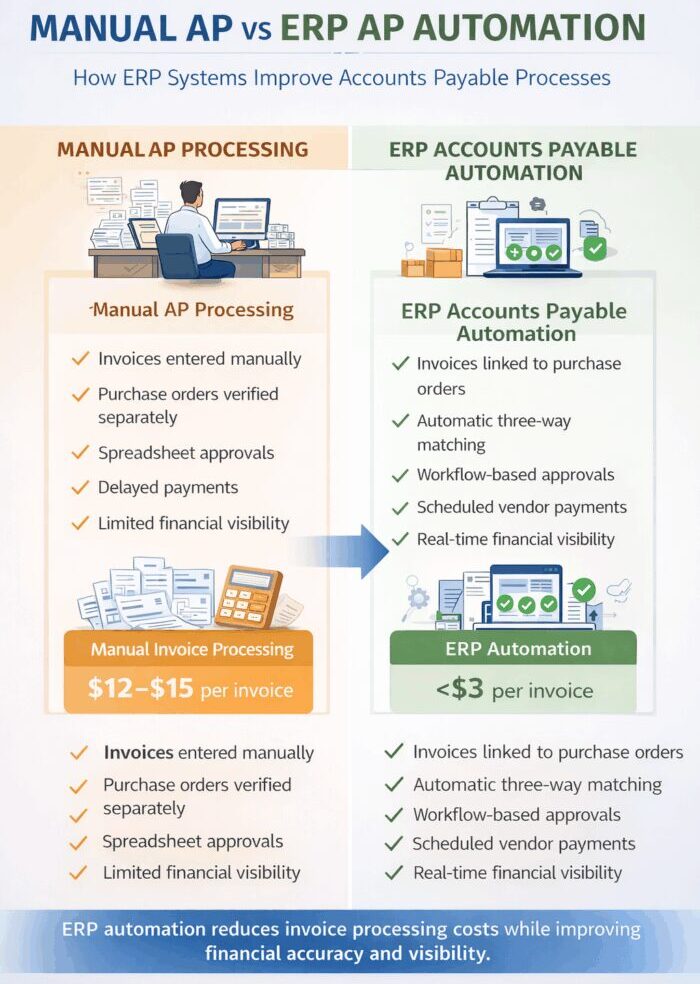
Manual invoice processing is one of the slowest finance tasks in most companies. Studies show manual invoice processing can cost more than $12 per invoice once you count labor, corrections, and approval delays.
Companies that automate AP workflows cut processing costs. They also see their finances more clearly.
The AP Automation Maturity Model shows three stages:
- Paper-Based: Paper invoices arrive and someone types them into the accounting system. Approvals then move by email or paper.
- Semi-Automated: Some invoices arrive digitally. Staff still approve and check them by hand.
- Fully Automated: Invoices generated from procurement workflows or financial vouchers move automatically through approval workflows and financial validation processes as part of a procure-to-pay (P2P) automation system.
Companies at this stage process invoices faster and gain stronger financial control.
The Mechanics of Efficiency: How AP Automation Works
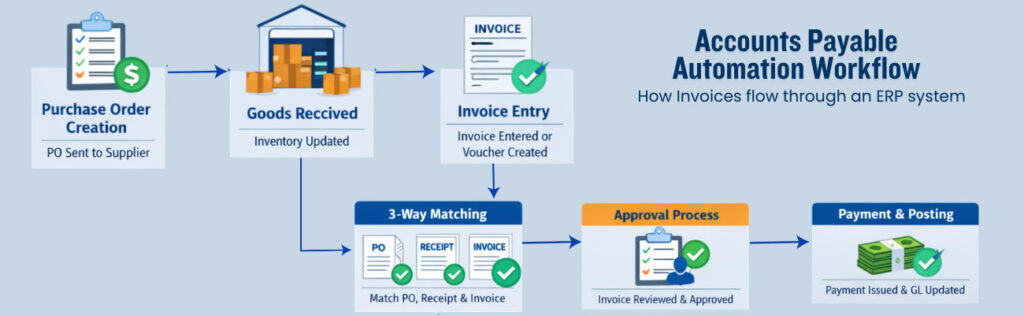
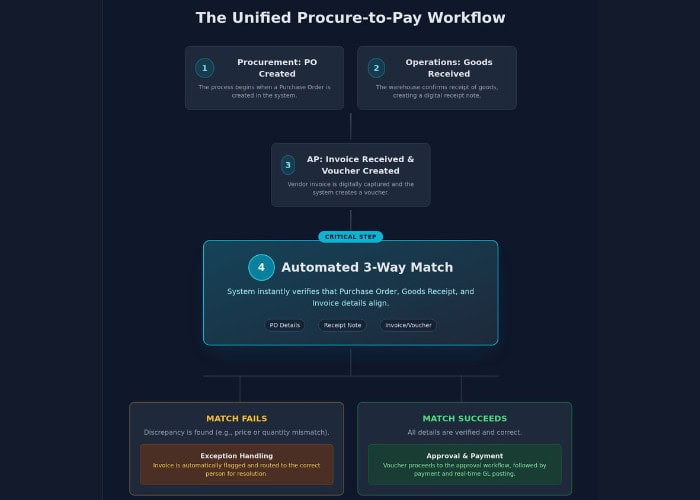
A modern accounts payable automation workflow replaces slow manual steps with a clear digital process.
- Step 1: Procurement and Voucher-Based Invoice Capture: Invoices come from purchase orders, goods receipts, vendor bills, or internal vouchers. This ties every payable directly to purchasing and inventory records. In Kechie ERP, these transactions flow from purchasing into your financial records.
- Step 2: Automated Data Validation: The system captures invoice data like vendor name, totals, and payment terms. It then checks that data against vendor records and purchase orders. You skip manual entry and keep data accurate.
- Step 3: The 3-Way Match: The system compares the vendor invoice, the purchase order, and the goods receipt. You pay only for items you ordered and received.
- Step 4: Exception Handling: Some invoices fail checks because of price or quantity mismatches. The system sends these to the right person for review. Your finance team handles only the invoices that need attention.
Mastering the 3-Way Match in Manufacturing and Distribution
If you manage physical inventory, the 3-way match is your main financial control.
This process compares:
- vendor invoices
- purchase orders
- goods receipts
If all three match, the invoice moves to approval on its own.
Linking AP to purchasing and inventory records stops duplicate payments and wrong vendor bills.
When implemented within an integrated ERP platform such as Kechie ERP, this check becomes one step in a full procure-to-pay workflow.
Siloed Apps vs Unified ERP: Choosing the Right Architecture
Choosing the right system design is one of the biggest decisions you make when you automate finance.
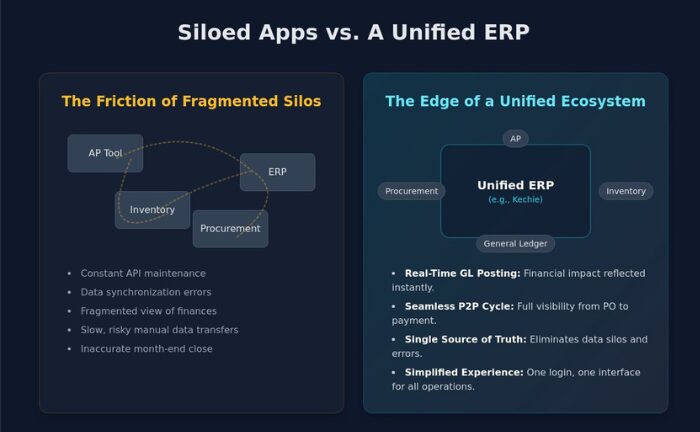
Many companies use separate apps for purchasing, accounting, and invoicing. Each app works alone. Together they create hidden delays and errors.
When staff copy financial data between systems by hand, errors rise and reporting gets harder.
A unified ERP like Kechie cloud ERP solves these problems. It keeps operations and finance data in one place.
An integrated ERP connects purchasing, inventory, and accounting. Daily activity then updates financial records on its own.
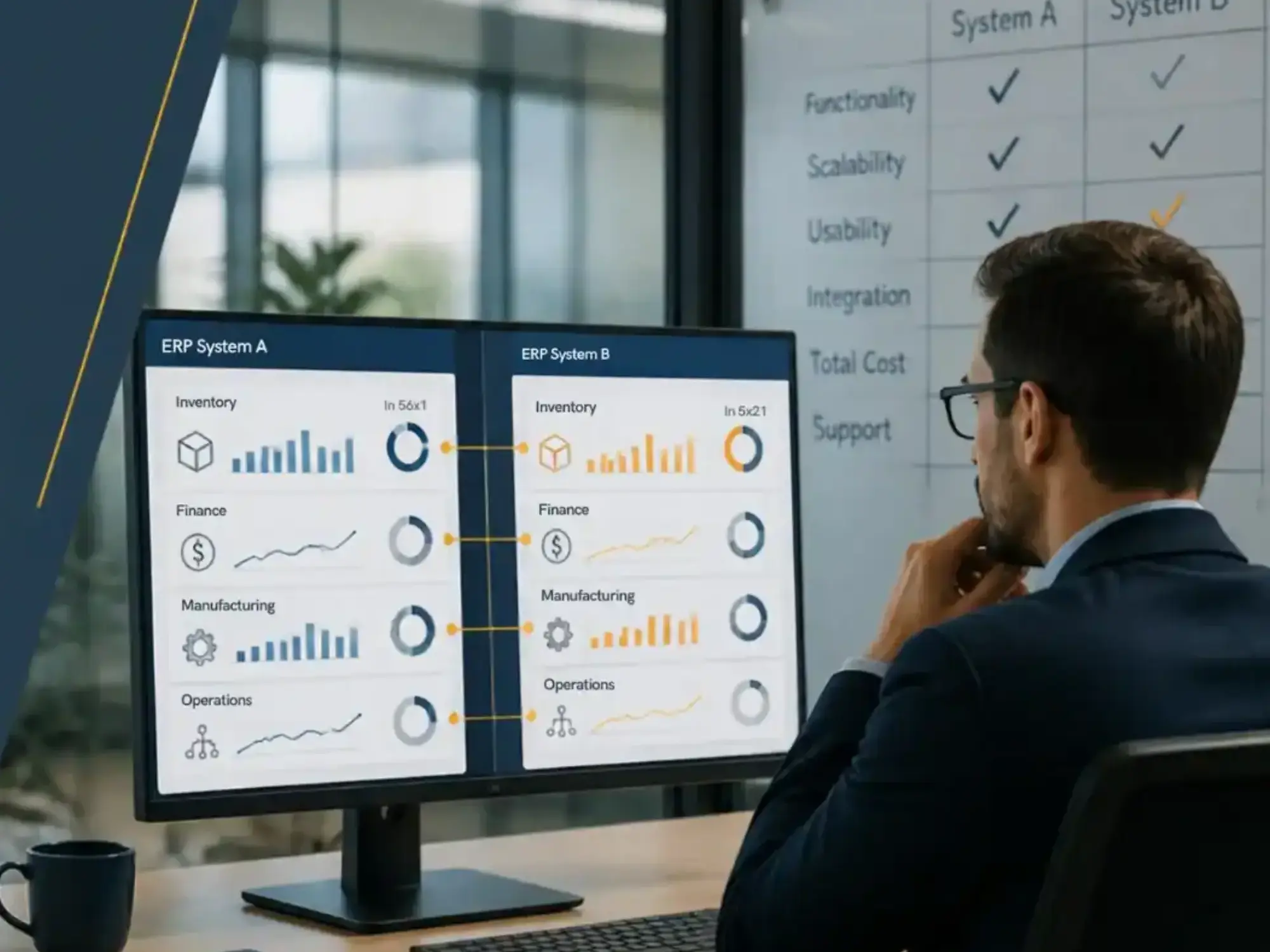
Many businesses start with ERP financial management. It lets finance teams track liabilities and vendor balances in real time.
The Unified Edge: Kechie’s Integrated Ecosystem
Kechie ERP removes the delays caused by separate business apps.
In Kechie, accounts payable automation is one part of the full procure-to-pay process.
Invoices link directly to purchase orders and goods receipts. The system checks each transaction before payment approval.
One system gives you:
- real-time financial visibility
- centralized vendor management
- automated invoice validation
- simplified approval workflows
Operations and finance data live in the same system. Your team no longer has to match data across apps.
A Strategic Roadmap for Implementing AP Automation
Moving to accounts payable automation software requires a clear plan.
- Conduct a Workflow Audit: Review your current AP process. Find bottlenecks and manual tasks.
- Clean Vendor Master Data: Automated workflows need accurate vendor records.
- Define Approval Hierarchies: Set approval rules by invoice amount and department.
- Launch a Phased Rollout: Start with your highest-volume vendors. Then expand to the rest of the company.
- Focus on Change Management: Automation ends repetitive data entry. Your team then spends time on analysis with ERP financial management tools.
Setting Your KPIs for Success
Track these KPIs after you launch accounts payable automation:
- Cost per invoice
- Days Payable Outstanding (DPO)
- Straight-through processing rate
- Exception rate
These numbers show you how much automation helps.
Overcoming Common Implementation Hurdles
Vendor onboarding is the most common hurdle.
Ask vendors to send invoices through one standard process. This improves accuracy and cuts delays.
Your system must also meet accounting standards and regulations.
A modern ERP makes this easier. It combines compliance, reporting, and daily operations in one place.
Ready to Streamline Your Financial Operations?
Companies that automate AP cut manual work, improve accuracy, and see vendor balances more clearly.
Want to see automated invoice processing in action? Schedule a Kechie ERP demo and see how it fits your operations.
Frequently Asked Questions (FAQs)
What is accounts payable automation?
Accounts payable automation uses digital workflows and software to capture, check, approve, and process vendor invoices. No manual data entry is needed.
What is the difference between AP automation and electronic invoicing?
Electronic invoicing only means sending invoices digitally. Accounts payable automation handles the full invoice process: checking, approval, and payment.
How does AP automation improve financial visibility?
Invoice data is recorded right away and linked to purchase records. Finance teams see what they owe and when it is due in real time.
Can AP automation integrate with procurement systems?
Yes. In ERP platforms like Kechie, accounts payable automation is part of a larger procure-to-pay workflow. It connects purchasing, inventory, and finance.
How much time can AP automation save?
Many companies cut invoice processing time by up to 75% after implementing automated workflows.
Does AP automation replace accounting teams?
No. Automation removes repetitive tasks. Finance staff can then focus on planning, vendor management, and key decisions.
What industries benefit most from accounts payable automation?
Distributors, manufacturers, wholesalers, and supply chain firms gain the most. Their finance work ties closely to purchasing and inventory.
How long does it take to implement AP automation?
It depends on your systems and vendor setup. Many companies roll out automation in phases over several weeks.
Schedule a Free Demo Today!
See how Kechie ERP can transform your business, save you time, money, and aggravation. Click the button below to schedule your free demo.
Schedule Your Kechie Demo Now!In This Article
-What is Accounts Payable Automation and Why Is It Critical in 2026?
-The Mechanics of Efficiency: How AP Automation Works
-Mastering the 3-Way Match in Manufacturing and Distribution
-Siloed Apps vs Unified ERP: Choosing the Right Architecture
-The Unified Edge: Kechie’s Integrated Ecosystem
-A Strategic Roadmap for Implementing AP Automation
-Setting Your KPIs for Success
-Overcoming Common Implementation Hurdles
-Frequently Asked Questions