You know you need to move on from QuickBooks. The signs have been there for a while — the spreadsheets, the manual workarounds, the month-end close that takes forever. But every time you get close to pulling the trigger, the fear kicks in. What happens to all your data? Will your team actually use the new system? What if the transition disrupts your operations at the worst possible time?
These are legitimate concerns. And this article answers all of them.
The Fear Is Real — But So Is the Solution
Leaving QuickBooks feels like a big deal. For most growing businesses, QuickBooks has been there from the beginning. Your accounting team knows it inside and out. Your data — years of transactions, customers, vendors, inventory history — lives in it. The idea of ripping all of that out and starting over is genuinely intimidating.
But here’s what most businesses don’t realize: moving to a modern enterprise ERP doesn’t have to mean starting over. It doesn’t have to mean months of disruption, lost data, or a team that spends weeks figuring out a new system before they can get any real work done.
The right ERP solution doesn’t ask you to abandon QuickBooks overnight. It meets you where you are, brings your data with you, and gets your team productive in days — not months.
That’s not a sales pitch. That’s what the transition actually looks like when it’s done right.
Why Businesses Stay on QuickBooks Too Long
The fear of switching is real — but it’s worth examining what’s actually behind it, because most of the fear is based on horror stories about the wrong kind of ERP implementation.
Fear #1: We’ll lose our data.
Years of transaction history, customer records, vendor information, inventory levels — the idea of losing any of it is terrifying. And with some enterprise ERP systems, data migration is genuinely complex, expensive, and risky. But it doesn’t have to be. The right ERP partner handles data migration directly, bringing your existing QuickBooks data into the new system cleanly and accurately.
Fear #2: Our team won’t adopt it.
You’ve probably seen this happen — a company rolls out new software, the team resists it, and six months later everyone’s back to their old workarounds. This is almost always a symptom of software that’s too complex, too different from how the team already works, or implemented without proper support. The right ERP is intuitive enough that new users are productive within a day or two — and the implementation team stays with you through the transition, not just the go-live.
Fear #3: The timing is never right.
There’s always a busy season coming up, a big order to fulfill, a key hire that needs to settle in first. The timing will never be perfect. But every month you wait is another month of manual workarounds, fragmented data, and decisions made on incomplete information. The cost of waiting is real — it just doesn’t show up on an invoice.
Fear #4: What if it doesn’t work for our industry?
This is a legitimate concern with some ERP systems — generic solutions that don’t understand the specific needs of manufacturers, distributors, food and beverage companies, or nonprofits. But not every ERP is generic. The right one comes pre-configured for your industry, with the workflows, reports, and functionality your business actually needs — out of the box.
The QuickBooks Ceiling: When Enough Is Enough
Before we talk about the switch, it’s worth being clear about when you’ve actually hit QuickBooks’ limits — because some businesses stay longer than they need to, and others try to leave before they’re ready.
You’ve genuinely hit the ceiling when:
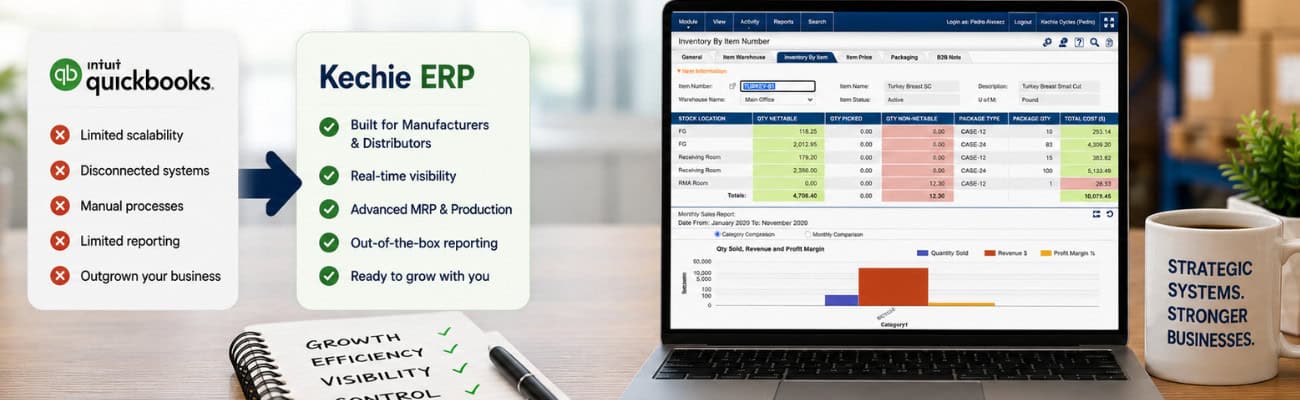
Your operations have outgrown your accounting tool. QuickBooks is fundamentally an accounting system. It was never designed to manage inventory across multiple locations, track lot numbers and expiration dates, run manufacturing work orders, or handle complex procurement workflows. When your operations demand more than accounting, QuickBooks stops being a solution and starts being a constraint.
You’re running your business on integrations and workarounds. Third-party inventory apps bolted onto QuickBooks. Spreadsheets for things the system can’t handle. Manual data entry between systems that don’t talk to each other. Every workaround is a sign that you’ve hit a ceiling — and every workaround adds risk, time, and cost.
Your team is spending time on data instead of decisions. If your operations manager spends Monday morning reconciling data between systems instead of managing operations, that’s QuickBooks holding your business back. Real-time visibility across every aspect of your business shouldn’t require manual effort — it should just be there.
You can’t get the reports you need. QuickBooks reporting is built for accountants, not operators. If you’re exporting data to Excel to build the reports you actually need to run your business, you’ve outgrown the tool.
You’re planning to grow — and QuickBooks doesn’t scale. If your plans include new product lines, new locations, more SKUs, higher order volumes, or more complex manufacturing, the time to upgrade your systems is before growth puts pressure on them — not after.
What a Smooth ERP Transition Actually Looks Like
The horror stories about ERP implementations are almost always about the wrong kind of implementation — enterprise systems that require months of build-out, third-party implementers, and complete operational disruption before anything works.
A well-designed, out-of-the-box enterprise ERP transition looks completely different. Here’s what it actually involves:
Step 1: Discovery and configuration — not construction.
The first phase isn’t about building anything. It’s about understanding how your business works and configuring a system that already works to match. Your products, your workflows, your team structure, your reporting needs — all of this gets mapped into a system that’s already built and already running. This takes weeks, not months.
Step 2: Data migration — handled for you.
Your QuickBooks data — customers, vendors, items, transaction history, opening balances — gets migrated directly into the new system. A good implementation team handles this for you, validates the data, and makes sure nothing is lost in translation. You don’t need a data expert on your team. You need a partner who’s done this before.
Step 3: Parallel running — your safety net.
For a period before full go-live, you can run both systems in parallel — entering key transactions in both QuickBooks and the new ERP — so your team builds confidence in the new system before it’s the only one. This removes the “big bang” fear and gives everyone time to get comfortable.
Step 4: Go-live with support.
The moment you go live isn’t the moment your implementation team disappears. The right partner stays with you through the first weeks of live operation — answering questions, troubleshooting edge cases, and making sure your team is confident and productive. New users should be up and running in a day or two.
Step 5: QuickBooks integration — if you need it.
Here’s something most businesses don’t know: you don’t have to choose between your ERP and QuickBooks on day one. A two-way integration with QuickBooks Online means your financial data stays in sync while your operations run through the new system. You can transition your accounting team at their own pace — without forcing a sudden change that disrupts your financial close process.
What Kechie Does Differently
Most ERP vendors will tell you the transition is easy. Kechie can show you why it actually is — and the difference comes down to a few specific things.
Data migration is handled directly by the Kechie team.
No third-party migration vendor. No complex data mapping project that stretches for months. The Kechie implementation team handles your QuickBooks data migration directly — bringing your customers, vendors, inventory, and history into Kechie cleanly and accurately.
Your team is productive in days.
Kechie consistently earns “Best Ease of Use” recognition from Capterra — not because it’s missing features, but because it’s designed so that real people, in real businesses, can pick it up quickly. Most new users are productive within a day or two of training. That’s not typical for enterprise ERP — and it makes an enormous difference to a business that can’t afford weeks of downtime while teams learn a new system.
Two-way QuickBooks Online integration.
Kechie’s native two-way integration with QuickBooks Online means you don’t have to rip and replace overnight. Your operations run through Kechie. Your financials stay in sync with QuickBooks. Transition your accounting team when you’re ready — not because the implementation forced your hand.
Out of the box for your industry.
Whether you’re a manufacturer managing work orders and bills of materials, a distributor tracking lot numbers and expiration dates, a food and beverage company managing catch weights and best-by dates, or a nonprofit tracking donated inventory — Kechie comes pre-configured for how your industry actually works. No build-out required. No developer needed. Just configuration and go.
Full audit traceability from day one.
Every transaction logged with user, timestamp, and before-and-after values. Full access control with user role management so every team member sees exactly what they need. Real-time data across every module so everyone is always working from the same current picture. These aren’t add-ons — they’re built in from the moment you go live.
The implementation team stays with you.
From discovery through go-live and beyond, the Kechie team works alongside yours. When questions come up — and they always do in the first weeks of a new system — you have a US-based team that responds quickly, knows your business, and helps you solve problems fast. Unlike many ERP vendors, Kechie doesn’t pass you off to a third-party implementer. You work directly with the Kechie team from day one.
Here’s what customers say about the experience:
“The implementation team is great to work with and very quick in response. Kechie has made our business run much easier.”
“It has been very user friendly and the team was great in training and answering our questions during implementation.”
“Not only did Kechie help set us up for success, but the team has been amazing! They have been with us from the beginning of the process, until we went live. We are the first Donation Center in the City to have an Inventory Management system that maintains the data and integrity — and we owe it to Kechie.”
“When looking at new ERP software, we reviewed six or seven different software packages. Kechie was the one who gave us everything we were looking for. And our decision turned out to be a great one. I would highly recommend Kechie to anyone looking for a new ERP system.”
The QuickBooks to Kechie Timeline — What to Expect
Every business is different, but here’s a realistic picture of what the transition timeline looks like for most Kechie customers:
Weeks 1–2: Discovery and setup.
The Kechie team learns your business — your products, your workflows, your team, your reporting needs. Your data migration begins. Your system configuration starts.
Weeks 3–4: Configuration and data validation.
Your specific workflows are configured. Your migrated data is validated. Your team begins initial training on the system.
Weeks 5–6: Parallel running and final testing.
Your team runs both systems in parallel, building confidence. Final edge cases are resolved. Go-live readiness is confirmed.
Week 6–8: Go-live.
You’re live on Kechie. Your team is operational. The Kechie support team is on hand for the first weeks to make sure everything runs smoothly.
Ongoing: QuickBooks transition at your pace.
If you’re maintaining the QuickBooks integration, your accounting team transitions on their own schedule — not one dictated by the implementation timeline.
This is what weeks, not months, actually looks like in practice.
Real Businesses. Real Transitions.
The businesses that have made this transition consistently report the same thing: the fear was worse than the reality.
A Sales Manager at a retail company described what the transition felt like for their less technical team members: “The system is user-friendly, accommodating even our less tech-savvy team members. The ease of use and a noticeable increase in sales revenue confirm that investing in this system is entirely worthwhile.” That’s the adoption fear answered directly — in the words of someone who lived it.
An Operations Manager at an electrical manufacturing company put it simply: “We are very happy with this software. It is user-friendly, direct and easy to use for anyone even if they are not tech savvy. This program allows us to pack and ship and to keep inventory.” A team that can’t afford weeks of downtime learning a new system needs exactly that.
A nonprofit that became the first Donation Center in their city to implement an inventory management system said: “Not only did Kechie help set us up for success, but the team has been amazing! They have been with us from the beginning of the process, until we went live. We owe it to Kechie.” For organizations worried about being left alone after go-live, that says everything.
And for those who went through the evaluation process carefully before committing: “When looking at new ERP software, we reviewed six or seven different software packages. Kechie was the one who gave us everything we were looking for. And our decision turned out to be a great one.”
The pattern is consistent: businesses that make the move find that the transition was easier than they feared — and the results were better than they expected.
Is Now the Right Time to Make the Switch?
There’s never a perfect time. But there are signs that the time is right:
• You’re spending more time working around QuickBooks than working in it
• Your team is manually reconciling data between systems every week
• You’re planning growth that your current systems can’t support
• You’ve been “going to look at this next quarter” for more than two quarters
• You got a NetSuite or SAP quote and need a better option
If any of these sound familiar, the answer isn’t to wait for a better moment. The answer is to find out what the transition actually looks like for your specific business — with your data, your team, and your workflows.
That’s exactly what a Kechie demo shows you.
What to Expect From a Kechie Demo
A Kechie demo isn’t a product tour. It’s a working conversation about your business.
The Kechie team will ask about your current setup — what you’re running on, where the pain is, what your team needs. Then they’ll show you, in the actual software, what your business would look like running on Kechie. Real workflows. Real reports. Real data.
You’ll come away with a clear picture of what migration would look like, how long it would take, what it would cost, and what your team’s first week on the system would actually feel like.
No pressure. No hard sell. Just the information you need to make a confident decision.
Ready to See What’s on the Other Side?
The businesses that are thriving on Kechie today all had the same fear you might have right now. They made the move anyway — and they’ll tell you the same thing: they wish they’d done it sooner.
Book a free demo → www.myofficeapps.com/free-demo/
See what the transition looks like for a business like yours. Ask the hard questions. Find out how fast you could be live.
The chaos you’re worried about? It’s not what the transition actually looks like.
Schedule a Free Demo Today!
See how Kechie ERP can transform your business, save you time, money, and aggravation. Click the button below to schedule your free demo.
Schedule Your Kechie Demo Now!In This Article
-The Fear Is Real — But So Is the Solution
-Why Businesses Stay on QuickBooks Too Long
-The QuickBooks Ceiling: When Enough Is Enough
-What a Smooth ERP Transition Actually Looks Like
-What Kechie Does Differently
-The QuickBooks to Kechie Timeline — What to Expect
-Real Businesses. Real Transitions.
-Is Now the Right Time to Make the Switch?
-What to Expect From a Kechie Demo
-Ready to See What’s on the Other Side?