
Kechie ERP: Cloud ERP with Powerful Inventory Management
Kechie ERP: Cloud ERP with Powerful Inventory Management and End-to-End Traceability

Growing businesses hit operational roadblocks in different ways. For some, spreadsheets and disconnected apps break down as orders accelerate and warehouses expand. For others, a legacy ERP system becomes the bottleneck. Why? Because many of these older platforms were originally designed as accounting software, and only later added operational modules as an afterthought. The result is a patchwork of rigid features, costly customizations, and workflows that don’t truly fit how modern businesses run.
Either way, with legacy systems or spreadsheets the outcome is the same: poor visibility, inefficient processes, and frustrated teams.
Kechie ERP is the alternative. It’s a cloud-native ERP designed for growing businesses across industries and for organizations that need enterprise-grade ERP without enterprise overhead. With a strong focus on inventory management and full traceability, Kechie connects finance, warehouse, procurement, sales, and CRM—all in one streamlined system.
Why Cloud ERP and Traceability Matter
Modern supply chains are global, regulations are stricter, and customers expect transparency. Businesses need more than transactional record-keeping. They need real-time visibility and end-to-end traceability across every product, order, and financial transaction.
Imagine you need a report on X, Y, or Z/ Imagine you need to report to X about Z by tomorrow morning.
Kechie makes that possible. Unlike legacy ERPs that rely on batch updates or require heavy IT support, Kechie is fully cloud-native. Every transaction—an invoice, a shipment, a purchase order—updates instantly across all modules. That means no manual reconciliations, no overnight syncs, and no blind spots.
Why Kechie Stands Out
Inventory & Warehouse Control
- Lot and batch tracking with serialization to maintain end-to-end product history.
- Multi-warehouse and bin-level control for accurate, location-based visibility.
- Barcode scanning and license plate labeling (LPN) to streamline receiving and picking.
- Automated reorder points, cycle counting, and real-time inventory updates.
Warehouse Management (WMS) & Logistics
- Inbound receiving & put away with guided locations and bin moves.
- Picking, packing & shipping workflows tied directly to orders and inventory.
- Transfer & replenishment between bins and warehouses to keep the right stock in the right place.
- Labeling & documents: packing slips, carrier labels, and bills of lading.
- Carrier connectivity (e.g., via shipping integrations) for tracking numbers and status updates—so customers and teams always know where an order stands.
- Freight terms & rate options captured within the flow to reduce errors and speed fulfillment.
Order Management, CRM & B2B Portal
- Sales workflows from quote to invoice, tied directly to inventory.
- B2B eCommerce portal where customers can place orders, check status, and view invoices themselves.
- Built-in CRM to manage leads, accounts, and customer relationships.
Procurement & Supplier Collaboration
- Automated purchase orders and approvals.
- SupplierHub portal for vendors to confirm POs, submit quotes, and track activity in real time.
- Landed cost tracking and vendor performance scorecards.
Finance & Accounting
Legacy ERPs often feel strongest in accounting, but clunky in operations because finance came first. Kechie is different: its financials are built to move in lockstep with inventory, purchasing, and sales. That means the numbers always tell the whole story.
Key features include:
- General Ledger (GL): Fully integrated with every module, so financials update instantly as transactions happen.
- Accounts Payable (AP) & Accounts Receivable (AR): Automated billing, payments, invoicing, and collections tracking.
- Bank Reconciliation: Match cash, deposits, and payments across multiple accounts.
- Cost Center & Department Tracking: Assign revenue and expenses to specific teams, warehouses, or projects.
- Multi-Warehouse Costing: See profitability per site or business unit.
- Audit Trails: Every financial transaction logged for compliance and transparency.
- Revenue Recognition: Automates compliance by matching revenue to the right time period, contract, or performance obligation.
- Financial Dashboards & Reporting: Drill down from consolidated views into transaction-level detail, without waiting for batch updates.
Reporting & Analytics
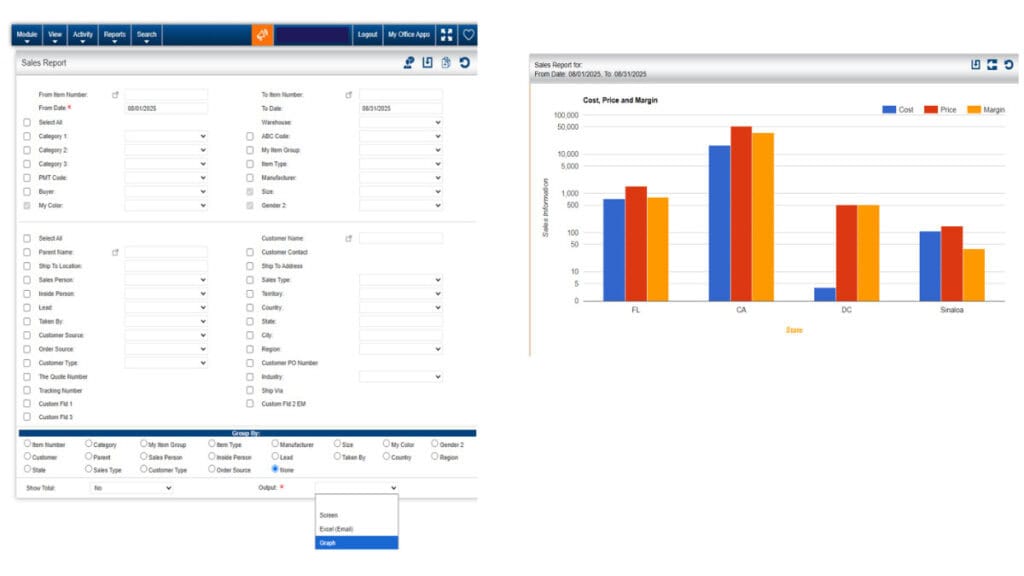
Reporting is where many ERPs stumble—requiring a consultant or custom report builder for even basic insights. Kechie flips that script with hundreds of pre-built reports across every module—finance, inventory, procurement, sales, CRM, and more. Teams get real-time, actionable information without waiting on IT. High-level dashboards and transaction-level drilldowns turn reporting into a daily advantage, not a project.
Integrations
Kechie connects with the tools modern businesses rely on every day. Some of the Out-of-the-box integrations include:
- Ecommerce – synchronize online storefronts with inventory and order management.
- Shipping – connect carriers and logistics platforms for real-time fulfillment and tracking.
- Tax Integration – automate tax calculation and compliance at checkout.
- EDI (Electronic Data Interchange) – streamline communication and document exchange with trading partners.
- Credit Card Processing (CC) – enable secure, integrated payment workflows.
- Point of Sale (POS) – unify retail and online sales data for accurate inventory and reporting.
- Marketplace Integrations – manage multichannel operations across platforms such as online marketplaces.
- Routing – optimize delivery routes to improve efficiency, reduce costs, and ensure on-time service.
Note: Kechie also offers a two-way QuickBooks Online integration, so companies that rely on QBO can keep accounting in sync with operational modules.
These integrations reduce manual data entry, eliminate silos, and help businesses manage sales, finance, logistics, and fulfillment from one connected ERP.
Kechie in Action: Industry Use Cases
- Distributors rely on Kechie’s lot tracking to manage recalls quickly and confidently, ensuring compliance while protecting customer trust.
- Manufacturers gain visibility into serialized production, manage bills of materials, and see real-time costing across work centers.
- Service Providers align project management, resources, and billing with financial reporting in a single system.
- Retailers unify ecommerce and in-store sales, keeping stock accurate and customer promises reliable.
- Nonprofits leverage Kechie’s transparent reporting to demonstrate accountability to donors, and grantors- ensuring confidence in how inventory, donations and funds are managed
Why Kechie vs. Traditional ERP
Many businesses assume they have only two choices: limp along with spreadsheets or wrestle with a traditional ERP. But traditional systems come with baggage. Most started as finance tools first, and operations were bolted on later. That’s why they often feel disjointed—accounting runs smoothly, but inventory, purchasing, WMS, and sales require workarounds.
Kechie offers a third path: an ERP built from day one to unify both finance and operations, with traceability at the core.
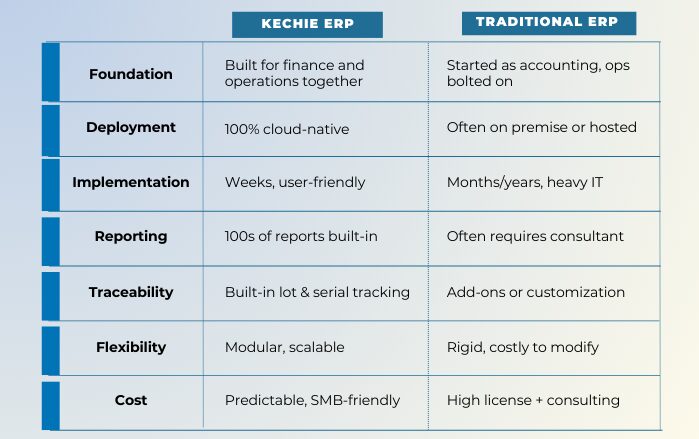
Kechie delivers enterprise-grade capability without enterprise overhead, giving companies a system designed for the way they operate today—not decades ago.
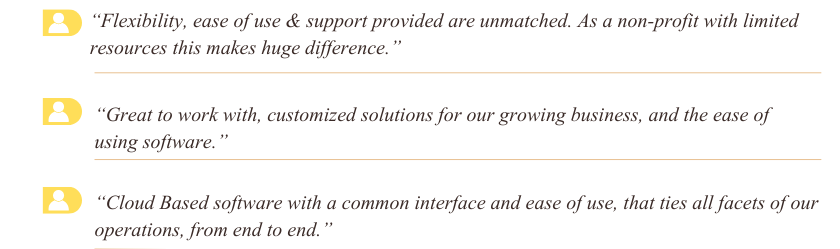
What Customers Say
The Bottom Line
Kechie ERP is purpose-built for companies that are growing fast—and for those weighed down by heavy ERP systems that no longer fit. It offers:
- A cloud-native platform that’s quick to implement.
- Robust inventory management with lot tracking and serialization.
- A complete WMS & logistics toolset for accurate, efficient fulfillment.
- True end-to-end traceability across the supply chain.
- Comprehensive finance & accounting tools, including revenue recognition.
- Hundreds of built-in reports across every module.
- Seamless integrations and portals that keep operations connected.
For growing businesses across industries that want enterprise-grade ERP without enterprise overhead, Kechie provides the clarity, control, and confidence to scale.
Contact us today to learn more about how Kechie ERP can transform your inventory management practices!

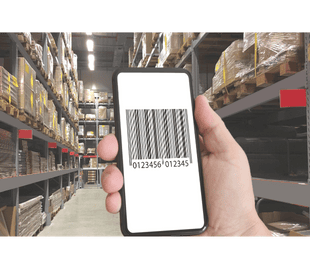
What Is a Barcode and Why It Matters for Operations
What Is a Barcode, and Why Is It Important?

If your team is still handwriting labels or manually entering inventory data, it's time to talk barcodes. These tiny, striped labels carry more operational weight than most people realize — especially in manufacturing, distribution, and logistics.
So, What Exactly Is a Barcode?
A barcode is a visual representation of data that machines can read. It’s usually a series of black and white lines (or squares, in the case of QR codes) that represent numbers or letters. Scan it with a barcode scanner or mobile device, and it instantly pulls up detailed product information — SKU, price, lot number, location, expiration date, and more.
In plain terms? It’s a fast, accurate way to identify and track things.
What Are the Different Types of Barcodes?
Not all barcodes are created equal. Here are a few common types used across operations, logistics, and manufacturing:
- UPC (Universal Product Code)
Used mostly in retail. You’ll find these on consumer products like food, clothes, and electronics. - Code 39
Common in manufacturing and defense. Supports both numbers and letters, making it flexible for internal tracking. - Code 128
Often used in logistics and supply chain. It holds more data than Code 39 and is compact — great for labeling parts or pallets. - EAN (European Article Number)
Similar to UPC but used globally. You’ll see this on products sold internationally. - QR Code (Quick Response Code)
Holds large amounts of data in a small square. Good for linking to documents, instructions, or websites. Easily scanned by smartphones. - Data Matrix
Ideal for small items, like circuit boards or medical devices. These barcodes can hold a lot of information in very little space. - PDF417
Used in ID cards, shipping labels, and inventory documents. It’s a 2D barcode that can store large files like signatures or images.
For operations teams, the right barcode depends on your workflows, label space, and how much data you need to encode. Systems like Kechie ERP support multiple barcode formats — so you’re not locked into just one.
Why Barcodes Matter in Day-to-Day Operations
Barcodes do more than help at the cash register. For growing companies, they streamline essential business functions:
- Inventory Control
Know what’s in stock, where it is, and how fast it’s moving. Barcode scanning reduces human error and improves accuracy across warehouses and locations. - Traceability & Compliance
Whether you're in food, healthcare, or industrial manufacturing, you need to know where products came from and where they’re going. Barcodes make traceability automatic. - Faster Transactions
From receiving to shipping, scanning barcodes speeds up every touchpoint. No more manual typing or sorting through paper. - Cost Reduction
Less manual labor, fewer errors, and better forecasting add up to reduced overhead — often by 20–30% when paired with a smart inventory system. - Data-Driven Decisions
Every barcode scan generates real-time data. That’s fuel for smarter purchasing, better planning, and more responsive operations.
How Barcodes Work With ERP Systems Like Kechie
Barcodes are most powerful when connected to your ERP. With Kechie’s built-in barcode capabilities, inventory updates happen automatically across modules — purchasing, inventory, order management, logistics, and manufacturing. That means:
- Scanning a product on receipt updates available stock immediately
- Picking an item for an order adjusts warehouse inventory in real-time
- Production runs can be tracked by job, lot, or serial number with no extra effort
Kechie also supports multi-location barcode tracking, making it easier for companies with multiple warehouses or distributed teams to stay coordinated.
Why It Matters Now
Manual entry isn’t just slow — it’s risky. Errors cost time, customers, and credibility. Barcodes close that gap. For companies looking to scale without losing control, barcoding is a no-brainer.
And when paired with a modern ERP like Kechie, barcodes turn into business intelligence. You’ll get the real-time visibility and traceability operations leaders like you need to stay ahead.
Contact us today to learn more about how Kechie ERP can transform your inventory management practices!
Stay tuned for our series of insightful blogs—your roadmap to exploring the full potential of an ERP.

ERP Implementation Without the Headaches
ERP Implementation Without the Headaches: 5 Things You Need to Get Right

ERP projects have a reputation—often well-earned—for taking too long, costing too much, and exhausting teams in the process. But it doesn’t have to be that way.
If you're leading operations, chances are you've seen at least one ERP rollout go sideways—too complex, too slow, or just not built for the way your business actually runs. The truth is, most of the pain comes down to poor planning and picking the wrong system.
Here are five things you need to get right if you want your ERP implementation to be clean, fast, and headache-free.
1. Choose Software That Fits Operations, Not Just Finance
Most ERP systems were built for finance first. Inventory, manufacturing, and supply chain were added on later. That creates gaps—especially when real-time visibility and cross-functional workflows are critical to your operation.
Look for a solution that’s built with operations at the core. Kechie ERP, for example, was designed around inventory and supply chain first. That means better fit, fewer workarounds, and less time customizing the system to match how your business actually runs.
Pro Tip: Accounting software is not an ERP. Many of the big-name players started as finance platforms and bolted on inventory or manufacturing features later. That can leave you with disconnected modules, limited functionality, and workflows that don’t match your real-world needs. If operations is the backbone of your business, choose a system designed to support it from day one.
2. Keep the Scope Clear and Tight
Trying to roll out every module at once usually backfires. It slows the project down, increases risk, and overwhelms your team.
Start with the workflows that matter most—like inventory, purchasing, or MRP—and phase in additional features over time. A phased rollout helps you go live faster and gets early wins you can build on.
Pro Tip: Communicate scope clearly and early—especially if more modules or functionality are coming later. Bring the right subject matter experts (SMEs) into the process from each department—inventory, finance, manufacturing, and logistics. Misalignment in the early stages leads to delays and rework later.
3. Don’t Skimp on Training
Even the best software fails without proper training. And rushed training right before go-live is a recipe for confusion.
Set up role-based training early in the project. Make sure each team member understands how to use the system for their specific responsibilities—not just generically.
Kechie ERP provides hands-on training led by people who understand operations, not just software.
Pro Tip: Practice, practice, practice. Don’t just sit through training—apply it. Have your team run through real scenarios, test transactions, and work inside the system right after every session. Practicing early builds confidence and avoids panic when you’re live.
4. Migrate Data Thoughtfully—Not All at Once
Trying to bring over everything from your old system—every PO, invoice, customer, and product record—is one of the most common (and costly) mistakes during implementation.
Clean your data before you migrate. Focus on what’s active and necessary—open orders, current inventory, live vendors and customers.
Pro Tip: Archive your historical data in Excel or a shared drive. You’ll still have access to past records when you need them, but you’ll avoid paying to import outdated or messy data into your new system. It's cleaner, cheaper, and faster.
5. Demand Real-Time Visibility Across Teams
One of the main reasons operations teams move to ERP is to fix data silos. But if your new system doesn’t update in real time across departments, you're just swapping one siloed system for another.
Modern ERP should deliver integrated, real-time data across purchasing, inventory, production, and finance. Kechie ERP does this out of the box—no bolt-ons, no third-party tools required. That means fewer errors, tighter coordination, and faster decision-making.
Pro Tip: Real-time means immediate. Not overnight, not in tomorrow’s report—as soon as a transaction is made, the data should be available across the system. Anything less slows you down and opens the door to mistakes.
Bottom Line: A Smart Implementation Starts with the Right Plan—and the Right Partner
ERP implementation doesn’t need to drag on for a year. It doesn’t need to disrupt your operation or burn out your team. If you choose the right system, focus on scope, practice early, and take a lean approach to data, you’ll go live faster and with less stress.
Contact us today to learn more about how Kechie ERP can transform your inventory management practices!
Stay tuned for our series of insightful blogs—your roadmap to exploring the full potential of an ERP.

MOA Builds Purpose-Driven ERP on Progress OpenEdge
My Office Apps Builds Purpose-Driven ERP on Progress OpenEdge
August, 2025
My Office Apps (MOA) leverages the Progress® OpenEdge® platform to deliver its flagship ERP solution, Kechie, which powers a secure, cloud-based B2B portal that helps New Life Centers manage donations and support over 200 partner nonprofits. The platform’s reliability and ease of use help MOA and New Life expand their community impact.
Read the full story on how the platform’s architecture drives speed, security, and scale

Control the Full Inventory Lifecycle With Kechie ERP
How Inventory Really Moves in Your Business — and How Kechie ERP Keeps Every Step in Sync

Most Enterprise Resource Planning (ERP) software was built around accounting.
If you look at the big names — NetSuite, SAP, Microsoft Dynamics — they all started as financial systems. Inventory management, warehouse tracking, procurement, and logistics? Those came later. Often bolted on. Often disconnected.
Kechie was built differently.
It was designed from the ground up with inventory at the center — because in most businesses, everything starts with an item or a service. Whether you're fulfilling a customer order or issuing a purchase order, the first question is always: Do we have it?
Kechie ERP doesn’t treat inventory as a secondary module. It treats it as the operational core — and connects CRM, Order Management, Vendor Management, Purchase Orders, Receiving, Fulfillment, and Returns around it.
Let’s walk through how inventory really moves in your business — and how Kechie tracks every step in real time.
1. CRM — It Starts With the Customer
Before inventory moves, a customer makes a request — a quote, an inquiry, or an order.
Kechie’s built-in CRM connects sales to operations. Every opportunity, quote, or repeat order flows into your inventory planning and forecasting.
- Track customer order history and buying patterns
- Create accurate quotes that tie directly to inventory levels
- Pass demand forecasts directly into purchasing
2. Order Management — Reserve, Allocate, and Fulfill
Once a quote turns into a sale, Kechie’s order management system kicks in. It:
- Checks real-time inventory levels
- Allocates available stock by FIFO, expiration, or custom rules
- Sends pick, pack, and ship instructions to the warehouse
- Tracks status from confirmation to delivery
Inventory is adjusted immediately and accurately — no manual syncing, no errors.
3. Vendor Management & Purchase Orders — Smart Replenishment
If the system sees you're low on stock or need to fulfill backorders, Kechie’s purchasing workflow takes over:
- Generates POs automatically using vendor lead times, costs, and Material Requirements Planning (MRP)
- Routes approvals based on value or urgency
- Connects each PO directly to your receiving and payables workflows
Because vendor records and purchasing are tied to real-time inventory, your team always knows what’s coming in — and when.
4. Receiving Goods — Getting It Right at the Dock
When inventory arrives, Kechie’s receiving module verifies every detail:
- Scans incoming shipments
- Matches to the PO
- Flags discrepancies or damage
- Updates stock levels and bin locations in real time
Now your inventory is officially in the system — available to ship, build, or sell.
5. Pick, Pack, Ship — The Outbound Flow Done Right
Outbound logistics in Kechie follows a clear, repeatable process:
- Pick: Pull inventory based on location and accuracy rules
- Pack: Scan, confirm, and prepare packaging
- Ship: Print labels, assign carriers, and track in real time
As soon as it's shipped, the order is marked complete and inventory is reduced.
This step is fully connected to the original sales order, which makes reporting and accountability automatic.
6. Return and RTV — Closing the Loop with Control
Returns are often where ERPs fall apart. Kechie handles both directions:
- RMA (Customer Returns): Initiate returns from the original order, manage credit, restock or scrap
- RTV (Return to Vendor): Flag damaged or excess stock, issue returns tied to the original PO, and track replacements or refunds
Returns update inventory the moment they're processed — so your data stays clean.
Built Around Inventory. Built for Real Operations.
Where most ERPs start with accounting, Kechie starts with how businesses actually run.
- Inventory drives orders
- Orders drive fulfillment
- Fulfillment depends on vendors
- Vendors rely on clear demand
- And it all starts with what’s in stock — or what’s not
Kechie doesn’t just “track” inventory. It makes inventory the central nervous system of your business.
Kechie puts operations first — not as an afterthought.
If your current ERP makes inventory feel like an add-on, it’s time to rethink the foundation. With Kechie, every process that touches inventory — sales, purchasing, fulfillment, returns — is connected by design. You don’t have to manage around system gaps or force teams to work in silos. You just work.
Contact us today to learn more about how Kechie ERP can transform your inventory management practices!
Stay tuned for our series of insightful blogs—your roadmap to exploring the full potential of an ERP.

Why Kechie MRP Is the Smarter Way to Plan, Procure, and Stock
Why Kechie MRP is The Smarter Way to Plan, Procure, and Stock

When most people think of Material Requirements Planning (MRP), they immediately associate it with manufacturing. But the truth is, MRP isn't just for the shop floor. For growing businesses—especially distributors, wholesalers, and multi-location operations—an MRP system like Kechie offers powerful tools that go well beyond production scheduling.
Plan With Confidence Using a 52-Week Forecast
Kechie’s robust MRP engine provides a 52-week forward-looking calendar that gives you a clear view of material needs based on real-time demand and historical usage. This helps businesses:
- Maintain optimal stock levels
- Avoid tying up capital in excess inventory
- Reduce the risk of stockouts that lead to missed sales or delivery delays
With this long-range planning capability, you're not reacting to issues—you’re staying ahead of them.
MRP Action Reports: Your Daily Decision Engine
Imagine starting your day with a clear, concise list of what needs attention. Kechie makes this possible with its real-time MRP Action Reports, which surface:
- Recommended purchase orders
- Low-stock alerts
- Inventory transfers across locations
These reports allow your team to act fast and decisively, streamlining daily workflows and reducing the burden of manual tracking or guesswork.
Automate Purchase Suggestions
Procurement teams often rely on spreadsheets, gut instinct, or static reorder points. Kechie MRP takes a smarter approach.
By analyzing demand trends, lead times, and safety stock thresholds, it automatically generates purchase suggestions—which can be reviewed and converted into purchase orders in just a few clicks. The result? Faster buying decisions, fewer errors, and better supplier relationships.
Streamlined Supplier and Lead Time Management
Kechie also simplifies how you manage vendor data. The system tracks key supplier details—such as pricing tiers, payment terms, and delivery performance—allowing you to evaluate vendor reliability and forecast deliveries with greater precision.
This helps ensure you’re always ordering from the right source, at the right time.
Real-Time Multi-Location Inventory Visibility
Whether you're managing stock in a single warehouse or across multiple facilities, Kechie provides a centralized view of all your inventory. You’ll always know:
- What’s in stock
- What’s on order
- Where each item is located
This visibility translates into faster decision-making and better coordination between purchasing, sales, and operations.
Simple, Scalable, and Seamlessly Integrated
Kechie MRP doesn’t require a team of IT experts to set up or manage. It’s a cloud-based, user-friendly platform that’s fully integrated with the broader Kechie ERP system, making it ideal for businesses looking to scale without added complexity.
Whether you're optimizing for growth or cleaning up inefficiencies in your current operations, Kechie gives you the tools to take control of your inventory and procurement with confidence.
Contact us today to learn more about how Kechie ERP can transform your inventory management practices!
Stay tuned for our series of insightful blogs—your roadmap to exploring the full potential of an ERP.

Why Distributors Need an ERP System to Scale Smarter
Why Distributors Need an ERP System to Scale Smarter

Running a distribution business isn’t easy. You’ve got customers expecting fast shipping, suppliers needing constant updates, and a mountain of moving parts to manage every single day. If you’re still trying to keep everything on track with spreadsheets or outdated systems, you’re probably already feeling the pressure.
That’s where ERP software comes in.
ERP (Enterprise Resource Planning) software helps you bring your entire operation into one place, so your team can spend less time chasing problems and more time growing the business.
One System for Everything
Imagine if your inventory, sales, purchasing, shipping, and accounting were all connected. No more double entries. No more bouncing between programs or calling your warehouse to check if something is in stock.
With ERP, you get that all-in-one view. Everything is centralized, and updates in real time, so you always know what’s going on.
No More Inventory Guesswork
In distribution, managing inventory control is critical. Stock shortages can lead to missed revenue, while overstocking ties up valuable resources and warehouse space.
ERP systems help you find the balance. They track what you have, what you’re low on, and what needs to be reordered—all automatically. No guesswork. No sticky notes.
Orders That Practically Process Themselves
With ERP, processing orders becomes smooth and streamlined. From taking the order to getting it out the door, every step flows into the next.
You reduce errors, speed up delivery, and keep customers happy—all while giving your team more time to focus on what matters.
Finances You Can Actually Keep Up With
Tired of waiting until the end of the month to know where things stand? An ERP system updates your books automatically as orders are processed and payments post--no delays, no manual work.
You get real-time financial visibility without chasing reports or digging through spreadsheets.
Now Let’s Talk About Kechie ERP
If you’re looking for an ERP system built with distribution businesses in mind, Kechie ERP by My Office Apps is worth a serious look.
It’s cloud-based, which means you can access it from anywhere. Whether you’re in the office, on the warehouse floor, or checking in from home, Kechie keeps you connected.
Its easy access makes it so that every part of your business, from the CEO to the warehouse, can have access to it. It enhances the supply chain and you can start with the features you need most, like inventory, order management, or purchasing, and expand as your business grows. It’s designed to scale with you, not slow you down.
Build Better Relationships without the Chaos
Kechie ERP makes it easier to stay on top of vendor communications, purchase orders, and customer service—without relying on email threads or sticky notes. Everyone on your team has access to the same up-to-date information, so nothing slips through the cracks. It allows insights into inventory and order processing for enhanced control, which can also reduce operational costs.
Kechie ERP also manages inventory across multiple warehouses, so you can seamlessly transfer stock in and out between locations to efficiently meet demands and optimize inventory flow in the procurement and sales process.
Need to follow up on a shipment? Want to check customer order history? It’s all there—in one place.
Real Insights, Real-Time Decisions
One of the best parts of Kechie ERP is how it helps you make better decisions. You get real-time dashboards, built-in reports, and easy-to-read analytics that show you what’s working—and what needs attention.
No waiting. No guessing. Just clear, actionable insight.
Final Thoughts: ERP Isn’t Just a Tool—It’s a Game Changer
Whether you're managing a few hundred SKUs or thousands, ERP can make your distribution business faster, smarter, and easier to run. And if you’re ready to take the next step, Kechie ERP is a great place to start.
It’s simple, scalable, and designed to help distributors like you work smarter—not harder.
Contact us today to learn more about how Kechie ERP can transform your inventory management practices!
Stay tuned for our series of insightful blogs—your roadmap to exploring the full potential of an ERP.
My Office Apps Launches Kechie 3PL
My Office Apps Launches Kechie 3PL: A True ERP for Third-Party Logistics Providers
IRVINE, Calif., July 9, 2025 /PR Newswire.com/ — My Office Apps (MOA), the company behind Kechie ERP, has released Kechie 3PL—a purpose-built module designed for businesses that provide third-party logistics (3PL) services. Kechie 3PL allows logistics providers to manage multiple customers' inventory and fulfillment operations in real time, all from a single, secure cloud-based ERP system.
Read more on PR Newswire
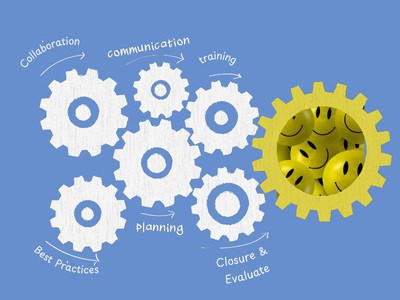
ERP Implementation
Why We Go Deep on ERP Implementation—and Why It Pays Off

ERP failures don’t usually happen because of bad software. They happen because of poor implementation. Rushed planning. Dirty data. Processes that don’t align. And teams left to “figure it out” on their own.
That’s why at My Office Apps, we don’t treat implementation like a one-week setup call. We treat it like the strategic phase it is. We get involved early, ask the hard questions, and stay with you until the system is running the way your business runs.
Here’s why that approach works—and what you gain by getting it right from day one.
We Start With Your Reality, Not Just Our Software
Most ERP vendors lead with features. We start with your operations.
Before a single module is configured, we work with your team to map how your business actually works—from purchasing and inventory to production and finance. That means understanding not just your ideal workflows, but the messy, real-world stuff too.
Why? Because software should fit the business—not the other way around.
We Operate on Best Practices—Even When It’s Hard
You’re hiring us for expertise, not just a tool. That’s why we don’t just replicate broken processes or take shortcuts to meet an arbitrary deadline.
We implement based on industry best practices—period. Even when that means slowing down, challenging assumptions, or untangling legacy workarounds.
Because long-term success starts with getting the fundamentals right, not going live fast and hoping for the best.
Clean Data Isn’t Optional—It’s Foundational
Bad data leads to bad decisions. Full stop. So we don’t just migrate your existing files—we clean them. That includes:
- Removing duplicates and inactive records
- Standardizing naming conventions and units of measure
- Mapping fields correctly between legacy systems and Kechie
If your ERP goes live with bad data, it becomes a source of confusion. When it's clean, it becomes a trusted source of truth. That’s a difference your team will feel immediately.
Sandbox Training: Learn in Your Environment, Not Ours
Training in a generic demo environment doesn’t reflect how your business works. That’s why every Kechie implementation includes access to a sandbox—a safe, fully-configured replica of your system where your team can practice using your actual data, processes, and structure.
Why it matters:
- Users build muscle memory with real scenarios—not simulations
- Teams can test workflows and catch issues before go-live
- Managers gain confidence that everything’s configured correctly
This approach makes the transition smoother and dramatically improves adoption. When users train in their own environment, they’re not just prepared—they’re confident.
We Build the System With You, Not For You
Every Kechie implementation is collaborative. We configure the platform to match your business rules, approval flows, and reporting needs—not just drop in standard templates.
We also include:
- Role-based access setup
- Automated workflows tailored to your process
- Reports and dashboards that match your KPIs
This ensures your team logs in on day one and sees a system that feels familiar, helpful, and built for them.
Training Isn’t a PowerPoint Deck
We train teams based on how they actually use the system. That means:
- Hands-on, role-specific sessions
- Real-world tasks, not hypothetical demos
- Clear documentation and support post-launch
Your warehouse lead doesn’t need to know the finance module. And your CFO doesn’t want to be trained on receiving workflows. We respect your time—and we train accordingly.
Fixing It Later Is Way More Expensive
Cutting corners during ERP implementation almost always leads to rework. And rework is costly. Downtime, retraining, lost trust—it adds up.
By investing in the right setup now, you get:
- Faster user adoption
- More accurate reporting
- Fewer support tickets
- A system that scales cleanly as you grow
Bottom line: you only get one chance at a clean start. We make sure you use it well.
Final Thought: Implementation Isn’t a Phase. It’s the Foundation.
A great ERP is only as good as its implementation. That’s why we treat this part of the process with the depth and discipline it deserves. We follow best practices—not shortcuts. We train your people in your system. And we do the heavy lifting upfront so you don’t face costly fixes later.
We take pride in getting it right the first time, investing the time and resources needed to set up every client for long-term success.
Because doing it right isn’t always easy—but it always pays off.
Contact us today to learn more about how Kechie ERP can transform your inventory management practices!
Stay tuned for our series of insightful blogs—your roadmap to exploring the full potential of an ERP.Read more

Multi-Warehouse Inventory Control While Short-Staffed
Keep Your Multi-Warehouse Inventory Synced While Short-Staffed

Managing inventory across multiple warehouse locations is already challenging. Add a short-staffed team to the mix—due to summer vacations, turnover, or hiring delays—and things can get messy fast.
That’s where Kechie ERP comes in. Its cloud-based, integrated approach makes it easy to stay in control of distributed inventory without relying on tribal knowledge or daily micromanagement.
If you’re an operations leader facing reduced headcount, here’s how you keep warehouses aligned without skipping a beat.
Real-Time Visibility Across All Locations
When staff are spread thin, you don’t have time to call, email, or ping for updates. You need one place to see:
-
- What’s in stock
- What’s in transit
- What’s running low
Kechie ERP’s multi-warehouse module gives you full visibility in real time, across every site. You can sort by location, category, quantity, or custom fields—so you’re not guessing which warehouse has what.
Automated Transfers and Replenishment
When demand shifts or one location is low, you don’t need a manual chase.
With Kechie ERP, you can:
-
- Set auto-replenishment rules between warehouses
- Define safety stock thresholds per site
- Schedule inter-warehouse transfers based on real usage
Access From Anywhere, Without the IT Wait
If your warehouse manager is out, or someone needs to check on inventory remotely, Kechie makes it easy. No VPNs. No local installs. No lag.
Because Kechie ERP is fully cloud-based and mobile-friendly, any authorized team member can:
-
- Check stock status
- Approve a transfer
- Monitor receiving or shipping logs
You stay agile even when your staff isn’t all under one roof—or available on-site.
Role-Based Access and Error Reduction
Short-staffed teams often rely on temps or floaters from other departments. That can create risk if systems are hard to use or too open.
Kechie allows you to:
-
- Control who can view or edit each location
- Automate common tasks to reduce manual input
- Track all activity for full traceability
Fewer errors, tighter control—and no lost time fixing data after-the-fact.
Consolidated Reporting for Faster Decisions
When you’re short on time and people, long reports are useless. You need clean data and fast answers.
Kechie ERP’s reports are:
-
- Drillable by warehouse, product, or time period
- Exportable for team meetings or financial roll-ups
- Customizable without developer help
This helps you prioritize and respond faster, whether it’s a transfer, reorder, or process change.
Make It Easier for Your Team to Succeed—Even With Less Help
Short-staffed doesn’t have to mean out of sync. With Kechie ERP, you’re not relying on memory, paper logs, or luck to keep inventory aligned across locations. You’re using live data, rules-based automation, and built-in flexibility to operate smarter.
Contact us today to learn more about how Kechie ERP can transform your inventory management practices!