

Business Process Optimization with ERP
Business Process Optimization with ERP
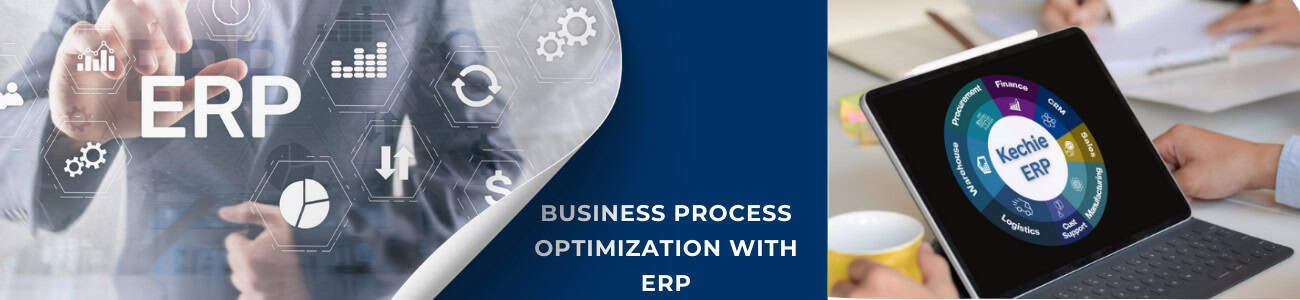
What is an ERP System?
ERP, or Enterprise Resource Planning, refers to software solutions designed to manage and integrate various business functions like finance, human resources, inventory, and customer relationships.
ERP Definition and History
At its core, ERP consolidates disparate systems into a unified platform, enabling seamless data flow across departments. The concept originated in the 1960s with material requirements planning (MRP) systems for manufacturing. Over time, ERP solutions evolved to include additional business functions, becoming a cornerstone for organizational efficiency.
Features of ERP systems include:
- Centralized data management
- Modular design tailored to specific needs
- Real-time reporting and analytics
- Automation of routine tasks
The Role of ERP in Business Process Optimization
ERP systems are designed to streamline and standardize processes across an organization.
Process Integration
An ERP solution eliminates silos by integrating data from all departments, ensuring consistency and accuracy. For example, inventory data flows seamlessly into sales and procurement, reducing redundancy and errors.
Automation and Efficiency
ERP software automates routine tasks, such as invoice processing and payroll management, freeing up resources for strategic initiatives.
Real-Time Insights
With built-in analytics, ERP systems provide actionable insights, enabling businesses to make data-driven decisions and respond swiftly to market changes, and enhance customer satisfaction.
Advantages and Disadvantages of ERP Systems
Advantages
- Increased Efficiency: Automation minimizes manual tasks and reduces errors.
- Enhanced Collaboration: A centralized system fosters better communication across departments.
- Scalability: ERP solutions grow with the business, adapting to increased demands.
- Regulatory Compliance: ERP systems often include features to meet legal and industry standards.
Disadvantages
- High Initial Costs: Implementation and customization can be expensive.
- Complexity: ERP systems require significant time and expertise to set up and maintain.
- Training Requirements: Employees need comprehensive training to use ERP software effectively.
Benefits of Implementing ERP Solutions
Investing in ERP systems yields substantial long-term benefits.
- Streamlined Operations: ERP consolidates processes, reducing duplication and inefficiencies.
- Improved Decision-Making: Real-time data enhances strategic planning.
- Cost Savings: Automation and optimization reduce operational costs.
- Enhanced Customer Satisfaction: Faster response times and accurate order fulfillment build trust and loyalty.
Challenges in ERP Implementation
Implementing an ERP system is not without challenges:
- Resistance to Change: Employees may be hesitant to adapt to new systems.
- Customization Issues: Tailoring ERP solutions to fit unique business needs can be complex.
- Data Migration: Transferring data from legacy systems to ERP software requires meticulous planning.
Overcoming Challenges
Organizations can effectively address these challenges through a multi-faceted approach. This includes meticulous planning that considers the specific needs and goals of the organization. Furthermore, comprehensive training programs are essential to equip employees with the necessary skills and knowledge to navigate the evolving environment. Finally, engaging experienced implementation partners can provide valuable guidance and support throughout the process, ensuring a smooth and successful transition. By implementing these strategies, organizations can minimize implementation challenges, ensuring a successful system rollout, and delivering improved efficiency, productivity, and a greater return on investment.
Conclusion
ERP systems play a pivotal role in business process optimization by integrating and automating workflows. Despite challenges in implementation, the benefits of ERP—such as improved efficiency, cost savings, and data-driven decision-making—make it an indispensable tool for businesses. As technology advances, ERP solutions will continue to evolve, offering even greater potential for process optimization.

Start the Year Strong with ERP: A Guide to Transforming Your Business Operations
Start the Year Strong with ERP: A Guide to Transforming Your Business Operations

If you're looking to start the year on the right foot, here's why ERP should be on your priority list—and how it can transform your business.
Why the New Year Is the Best Time to Invest in ERP
The beginning of the year offers a unique opportunity to implement transformative changes. Here’s why ERP adoption aligns perfectly with this timing:
1. Fresh Budget Allocation: The new year often comes with renewed budgets, allowing businesses to allocate resources for technology upgrades like ERP systems.
2. Operational Reset: Starting with an ERP system early enables businesses to streamline operations and avoid inefficiencies throughout the year.
3. Scalability for Growth: As businesses set ambitious goals, ERP provides the flexibility and tools to support expansion.
4. Improved Reporting for Strategy: Leverage ERP’s robust reporting features to analyze the previous year's performance and guide new initiatives.
Benefits of Starting the Year with ERP
1. Centralized Data Management
An ERP system like Kechie ERP integrates all your critical business functions—finance, inventory, manufacturing, sales, and more—into a single platform. This ensures that your data is accurate, up-to-date, and easily accessible for better decision-making.
2. Streamlined Processes
With ERP, manual processes like data entry, reconciliations, and inventory tracking are automated. This reduces errors and frees up your team to focus on strategic tasks.
3. Real-Time Insights
ERP provides real-time dashboards and reports, enabling you to monitor key performance indicators (KPIs) and adjust strategies as needed.
4. Enhanced Collaboration
By breaking down departmental silos, ERP fosters better communication and collaboration across teams, improving overall efficiency.
5. Future-Ready Scalability
A modern ERP system is designed to grow with your business, accommodating increased workloads, additional users, integration with e-commerce partners and new functionalities as needed.
ERP Myth: It’s Only for Big Businesses
One of the biggest misconceptions about ERP is that it’s only for large corporations. This myth couldn’t be further from the truth. Modern ERP solutions are scalable and customizable, making them accessible for small and mid-sized businesses.
Whether you’re a growing company or an established enterprise, ERP systems provide tools to manage operations efficiently and stay competitive in your industry.
Curious to learn more ERP Myth? Watch our video debunking common ERP Myths and see how businesses of any size can benefit.
How to Start the Year Strong with ERP
-
- Evaluate Your Needs
Assess your business operations to identify pain points and inefficiencies. Consider areas where ERP can bring immediate improvements, such as inventory management, financial reporting, or customer relationship management (CRM).
-
- Research ERP Solutions
Not all ERPs are created equal. Look for a solution tailored to your industry and business size, with features like scalability, user-friendly interfaces, and robust reporting tools.
-
- Plan for Implementation
Set realistic timelines for ERP implementation. The new year provides a clear starting point for introducing new processes and training your team.
-
- Engage Your Team
Involve key stakeholders from all departments to ensure the ERP system aligns with your operational goals and workflows.
-
- Partner with the Right Provider
Choose an ERP provider with a proven track record of successful implementations and excellent customer support.
Kechie ERP: Your Partner for Success in the New Year
If you’re ready to take your operations to the next level, Kechie ERP offers a comprehensive solution tailored to your needs. Key features include:
- Real-Time Reporting: Access accurate data and actionable insights instantly.
- Inventory Optimization: Track inventory levels and avoid costly overstock or stockouts.
- Financial Automation: Kechie Financial Module offers simplify accounting and tax compliance with automated workflows.
- Scalable Modules: Add functionalities as your business grows without disruptions.
Conclusion: Make This Year Count
The new year is a time of fresh beginnings and ambitious goals. Implementing an ERP system is more than a resolution—it’s an investment in your business’s future. With an ERP, you can streamline operations, improve decision-making, and set the stage for long-term success.
Start the year strong! Connect with us today and let our expert team guide you through the process of discovering the transformative potential of our solutions.
Stay tuned for our series of insightful blogs—your roadmap to exploring the full potential of ERP.
Inventory Valuation: The Key to Accurate Financial Reporting
Understanding Inventory Valuation: A Critical Step in Year-End Reconciliation

Stay tuned for our series of insightful blogs—your roadmap to exploring the full potential of ERP.

Why ERP Is Essential for Year-End Financial Reporting
Year-End Financial Reports Made Easy with ERP: Steps to Ensure Accuracy

This is where an ERP system steps in, offering tools to streamline financial reporting, ensure accuracy, and save time. Let’s explore how ERP software simplifies year-end financial reporting and the steps you can take to ensure your data is accurate and compliant.
Why ERP Is Essential for Year-End Financial Reporting
An ERP system like Kechie integrates all your financial data in one place, eliminating the need for spreadsheets and manual consolidations. Here’s how it adds value during year-end reporting:
1. Centralized Data: Access financial, inventory, and operational data from a single platform.
2. Real-Time Reporting: Generate accurate, up-to-date financial reports with minimal effort.
3. Automation: Streamline tasks like account reconciliations and tax calculations.
4. Compliance Support: Ensure adherence to accounting standards and tax regulations.
5. Audit Trail: Maintain a detailed log of transactions for easy auditing.
Steps to Ensure Accuracy in Year-End Financial Reporting
1. Clean Up Your Data
-
- Why It Matters: Inconsistent or incomplete records can lead to inaccurate reports.
- How ERP Helps: Use the data validation and cleansing features in your ERP to identify and correct discrepancies.
- Tip: Regularly reconcile accounts payable and receivable, and perform month-end closing procedures to maintain accurate financial records throughout the year. This practice reduces the workload and stress associated with year-end reporting.
2. Review Chart of Accounts
-
- Why It Matters: A well-organized chart of accounts ensures that all transactions are correctly categorized.
- How ERP Helps: Modify and standardize your chart of accounts within the ERP to simplify reporting.
- Tip: If your company has grown, consider restructuring the chart of accounts to reflect new business units or products.
3. Automate Reconciliations
-
- Why It Matters: Manual reconciliations are time-consuming and prone to errors.
- How ERP Helps: Leverage automated bank reconciliations and intercompany transaction matching.
- Tip: Conduct monthly reconciliations within your ERP to identify and address discrepancies promptly.
4. Monitor Inventory Valuations
-
- Why It Matters: Inventory inaccuracies can skew your financials and impact tax filings.
- How ERP Helps: Track inventory in real-time and use automated valuation methods like FIFO, LIFO, or weighted average.
- Tip: Schedule monthly cycle counts in your ERP to identify and resolve inventory discrepancies early.
5. Generate Preliminary Reports
-
- Why It Matters: Early reports help identify discrepancies and allow time for corrections.
- How ERP Helps: Run trial balance, profit and loss, and cash flow reports directly from the system.
- Tip: Share preliminary reports with department heads for review and approval.
6. Ensure Compliance with Tax Regulations
-
- Why It Matters: Incorrect tax filings can lead to penalties and audits.
- How ERP Helps: Use tax calculation modules to automate calculations and ensure compliance with local regulations.
- Tip: Update your ERP with the latest tax codes and rates before generating reports.
7. Leverage ERP Reporting Tools
-
- Why It Matters: Detailed and customizable reports provide insights for stakeholders.
- How ERP Helps: Utilize built-in reporting templates or customize dashboards to display key financial metrics.
- Tip: Choose the right ERP with drill-down reporting capabilities and versatile export options ensures easy sharing with your team or auditors.
The Role of Kechie ERP in Financial Reporting
Kechie ERP is designed to simplify year-end financial reporting for businesses of all sizes. Here’s how it ensures accuracy and efficiency:
-
-
- Real-Time Data Access: Eliminate delays and discrepancies with up-to-date financial information.
- Customizable Reports: Tailor reports to meet the unique needs of your stakeholders and regulatory bodies.
- Audit Readiness: Maintain a clear audit trail for every transaction, ensuring transparency.
- Multi-Currency Support: Simplify reporting for businesses operating globally.
- Tax Compliance: Automate tax calculations and ensure adherence to ever-changing regulations.
-
Benefits of Using Kechie Financial Management Software for Year-End Reporting
1.Time Savings: Automating tasks like reconciliations and report generation frees up your finance team for strategic planning.
2. Improved Accuracy: Eliminate manual errors and ensure consistent financial data.
3. Compliance Assurance: Stay updated on accounting standards and tax regulations.
4. Enhanced Decision-Making: Provide stakeholders with accurate, real-time financial insights.
5. Stress-Free Audits: Simplify audits with detailed transaction histories and organized financial records.
Conclusion
Year-end financial reporting doesn’t have to be overwhelming. By leveraging the features of an ERP system like Kechie ERP, you can simplify the process, ensure accuracy, and save valuable time. Whether you are preparing for audits, setting next year’s budget, or evaluating business performance, ERP software is the tool you need to succeed.
Stay tuned for our series of insightful blogs—your roadmap to exploring the full potential of ERP.

What Are the Top Reasons to Invest in Equipment Maintenance Software?
What Are the Top Reasons to Invest in Equipment Maintenance Software?

Prevent Unplanned Downtime
Unplanned downtime is one of the most disruptive issues a business can face. When essential equipment breaks down unexpectedly, production grinds to a halt, often resulting in missed deadlines, increased labor costs, and unhappy customers. Equipment Maintenance Software minimizes unplanned downtime by providing tools to schedule regular preventive maintenance and track equipment performance. By proactively monitoring equipment health, EMS helps identify potential issues before they become critical, keeping production schedules intact.
Extend Equipment Lifespan
Every machine or piece of equipment has a specific lifespan. However, equipment that undergoes regular, timely maintenance lasts significantly longer than those that are neglected. EMS within Kechie ERP helps businesses keep track of maintenance schedules, ensuring equipment receives the care it needs. From regular lubrication to part replacements, EMS supports proactive maintenance, which extends equipment life, delays replacements, and reduces capital expenditures over time.
Increase Efficiency and Productivity
Effective equipment maintenance is integral to maintaining a productive work environment. EMS simplifies maintenance workflows, from work order creation to task assignment and completion tracking. With mobile access to EMS, technicians can quickly access work orders, log updates, and view repair histories, reducing delays and minimizing the need for manual paperwork. This streamlined approach allows employees to focus on their tasks and reduces time spent on resolving equipment issues, ultimately improving operational efficiency.
Reduce Maintenance Costs
EMS helps organizations make better financial decisions regarding maintenance costs. By reducing the frequency of emergency repairs through preventive maintenance, businesses save on repair expenses and avoid costly overtime labor required to address last-minute issues. EMS also supports inventory management for spare parts, helping companies optimize parts stock levels, reduce excess inventory, and avoid expedited shipping costs for out-of-stock parts.
Maintain Safety and Compliance Standards
Workplace safety and regulatory compliance are vital considerations for businesses that use heavy equipment. A well-maintained machine is less likely to malfunction and cause safety hazards, ensuring a safer work environment for employees. EMS helps companies track and document all maintenance activities, creating a digital log that proves regulatory compliance during audits. Staying compliant not only avoids penalties but also fosters a culture of safety and responsibility in the workplace.
Access Valuable Data and Analytics
EMS provides valuable insights into equipment performance and maintenance history. With detailed data on repair frequency, maintenance costs, and downtime, businesses can make informed decisions about asset utilization and capital investment. EMS analytics can reveal trends that inform long-term maintenance strategies, such as identifying underperforming equipment or recognizing the ideal time for replacements. This data-driven approach enables businesses to optimize asset management, budgeting, and planning.
Improve Scheduling and Resource Allocation
EMS simplifies maintenance scheduling and resource allocation, ensuring that the right technicians, tools, and spare parts are available when needed. With Kechie EMS, companies can create automated maintenance schedules based on factors like usage, time, or performance metrics. This level of organization prevents over-scheduling, avoids unnecessary maintenance tasks, and ensures that resources are effectively used.
Enhance Communication Across Teams
For maintenance tasks to be completed effectively, clear communication between departments is crucial. Kechie EMS allows teams to centralize maintenance requests, updates, and work orders on a single platform accessible to all involved parties. This ensures that employees from different departments—such as production, logistics, and maintenance—have a unified view of equipment status, maintenance schedules, and any upcoming tasks.
Conclusion
Connect with us today, our expert team is here to guide you through the process and help you discover the transformative potential of our solutions.
Stay tuned for our series of insightful blogs—your roadmap to exploring the full potential of ERP.

Are These ERP Myths Holding You Back?
Are These ERP Myths Holding You Back? 6 Myths Busted!

When it comes to Enterprise Resource Planning (ERP) systems, there’s a lot of buzz. ERP is often hailed as the backbone of modern business operations, streamlining everything from inventory management to finance. But for all the praise, there are still many myths circulating that can leave businesses hesitant or misinformed. In this post, we’ll tackle the biggest myths about ERP and shed light on what they really bring to the table. By dispelling these misconceptions, we hope you’ll see why an ERP solution could be a game-changer for your business.
Reality Check: ERPs aren’t exclusive to Fortune 500 giants! Many small to medium-sized businesses (SMBs) think they don’t need ERP, but that couldn’t be further from the truth. In fact, SMBs often benefit significantly from ERP implementation because it helps them manage their resources more efficiently as they grow. Today’s ERP systems, like Kechie ERP, are scalable, designed to grow with your business. They are accessible, flexible, and customizable, which means small businesses can leverage the same high-level tools without the massive price tag.
Myth #2: ERP Systems Are Too Expensive
Reality Check: Yes, ERP systems were once prohibitively costly, especially when businesses had to invest in expensive hardware and infrastructure. But with cloud-based ERP solutions like Kechie ERP, the landscape has changed. Cloud-based ERP systems are more affordable and accessible, offering subscription-based models that eliminate high upfront costs. This makes ERP solutions a sound investment with high ROI, where the savings in time, accuracy, and efficiency often outweigh the costs.
Myth #3: Implementing ERP Takes Too Long
Reality Check: Implementing any new system requires planning, but modern ERPs are designed to be deployed much faster than the legacy systems of the past. With streamlined implementation processes and guided onboarding, businesses can often see ERP systems up and running in a matter of weeks rather than years. A solution like Kechie ERP, with its user-friendly interface, can quickly integrate with existing systems, minimizing disruption to business operations.
Myth #4: ERPs Are Overly Complex
Reality Check: ERPs have a reputation for being difficult to understand and navigate, but that’s no longer the case. Today’s ERP solutions emphasize simplicity and intuitive user interfaces that reduce the learning curve. Kechie ERP, for instance, focuses on a simplified user experience with an intuitive design, making it easy for team members across departments to get on board quickly.
Myth #5: ERPs Are Only Useful for Managing Inventory
Reality Check: While inventory management is a crucial ERP feature, it’s only one piece of the puzzle. A robust ERP system integrates all critical business functions—finance, HR, sales, customer service, supply chain management, and more—into one cohesive platform. By centralizing data, ERP solutions empower your team to make data-driven decisions, improve efficiency, and foster collaboration across departments. So, while inventory is a major component, the value an ERP offers goes far beyond that.
Myth #6: ERP Systems Are Outdated
Reality Check: Some believe ERPs are outdated relics of the tech world, but modern ERP systems continue to evolve. Today’s ERP solutions are designed with the latest cloud technology, AI-driven insights, and mobile accessibility, making them more relevant than ever in our digital age. Kechie ERP, for example, incorporates advanced cloud capabilities, allowing users to access the system from anywhere, ensuring businesses stay agile and connected.
Conclusion
Navigating the world of ERP systems can be daunting, especially with so many myths muddying the waters. But as technology continues to advance, ERPs are becoming more accessible, flexible, and beneficial for businesses of all sizes and types. Investing in a solution like Kechie ERP can help you streamline operations, gain valuable insights, and future-proof your business for sustained success.
Connect with us today, our expert team is here to guide you through the process and help you discover the transformative potential of our solutions.
Stay tuned for our series of insightful blogs—your roadmap to exploring the full potential of ERP.
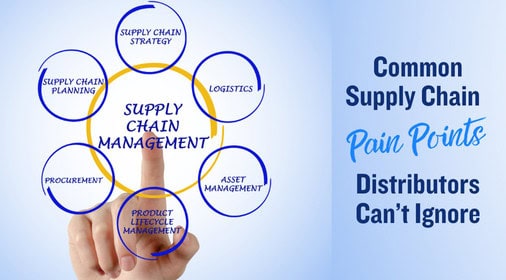
Common Supply Chain Pain Points for Distributors
What are Common Supply Chain Pain Points Distributors Can’t Ignore?
1. Inaccurate Demand Forecasting
The inability to forecast demand accurately leads to overstock or stockouts, both of which negatively impact profitability. Advanced ERP such as Kechie ERP equipped with AI-driven forecasting capabilities can help distributors manage inventory more effectively.
2. Supplier Issues
Managing multiple suppliers can quickly become overwhelming, especially when performance varies. A well-integrated vendor relationship management system can help monitor supplier performance and ensure accountability.
3. Order Management Complexities
With orders coming from various sources—wholesalers, direct buyers, or online platforms—distributors face challenges in streamlining the order process. An automated ERP order management system reduces errors and boosts fulfillment efficiency.
4. Returns & RMAs
When returns aren't handled smoothly, they can disrupt inventory levels and cause delays. An automated RMA process helps streamline return handling, improving warehouse efficiency and customer satisfaction.
5. Inefficient Inventory Control
The challenge of maintaining optimal stock levels continues to plague distributors. Investing in an ERP system like Kechie offers real-time inventory tracking helps to minimize human error and helps manage stock more efficiently.
6. High Logistics Costs
The rising cost of logistics—from fuel to labor shortages—creates ongoing pressure for distributors. Route optimization and transportation management systems can alleviate some of these challenges by improving efficiency and reducing costs.
7. Data Visibility
Without a clear picture of what’s happening in real-time, distributors are left making decisions reactively. A data-driven ERP system with reporting and analytics capabilities can offer transparency into every aspect of the supply chain.
8. CRM Challenges
Many distributors rely on disparate CRM systems that fail to communicate with other software. This disconnect can lead to inefficiencies and lost sales opportunities. Kechie ERP integrated with CRM functionality offers a comprehensive view of customer interactions.
9. Multiple Software Platforms
Distributors often find themselves using various applications to manage operations, leading to data silos and inefficiencies. Centralizing functions into a single ERP system can streamline operations and improve data flow.
10. Compliance Challenges
New regulations can throw a wrench in the smooth functioning of a supply chain. Distributors must remain compliant across all regions they serve. Automated compliance features in modern ERP systems can ensure timely adherence to ever-evolving laws.
Conclusion
To address these challenges effectively, distributors need a solution that integrates every aspect of their operations. Kechie ERP offers a robust platform that combines order management, inventory control, CRM, and compliance, empowering distributors to optimize their supply chain and drive sustainable growth.
Connect with us today, our expert team is here to guide you through the process and help you discover the transformative potential of our solutions.
Stay tuned for our series of insightful blogs—your roadmap to exploring the full potential of ERP.
What is Vendor Relationship Management?
What is Vendor Relationship Management (VRM) and Why It’s Essential for Your ERP and Inventory Software?

Let’s explore why these features are crucial for optimizing supplier relationships and driving business growth.
Why is Vendor Relationship Management Important?
1. Better Communication with Suppliers
Clear communication is the key to building strong supplier relationships. VRM tools within Kechie ERP and inventory system help streamline communication by supporting multiple contact management. This ensures that businesses can track and communicate with various people within a vendor’s organization, whether it's for accounting, sales, or support. Having all supplier contacts organized in one place makes it easier to collaborate and avoid confusion.
2. Vendor Contract Management
Vendor contracts are the backbone of supplier relationships, detailing terms, pricing, and obligations. Managing these contracts manually can be a challenge, but Kechie ERP with VRM tools streamlines automated contract tracking. This ensures that you stay on top of renewals, performance expectations, and compliance, helping you avoid missed deadlines or financial penalties.
3. Vendor GL Setup for Accurate Financial Management
Vendor GL setup is crucial for managing your finances effectively. In VRM systems integrated with Kechie ERP software, you can assign vendors to specific general ledger accounts. This allows businesses to track expenses, costs, and payments against the appropriate financial accounts. By automating this process, you reduce errors and improve financial reporting accuracy.
4. Emailing from the Software
VRM in Kechie ERP system also enables direct email communication with vendors from the software. This feature allows you to send purchase orders, contracts, invoices, or any other documents directly to suppliers without needing to switch between platforms. All communication is logged within Kechie ERP system, so you have a complete history of email interactions at your fingertips.
5. Managing Multiple Locations
Many businesses deal with vendors that have multiple locations. Whether you’re sourcing from different warehouses or shipping to various branches, VRM tools help track and manage vendors across multiple locations. This ensures that you have complete visibility into where products are coming from and going to, enabling smoother logistics and more effective supply chain management.
6. Monitor Supplier Performance
Tracking supplier performance is key to making informed decisions. Kechie ERP with VRM capability helps you monitor metrics like delivery times, product quality, and order consistency. This data is invaluable for evaluating suppliers, resolving disputes, or negotiating better terms.
7. Add Notes for Better Vendor Tracking
Keeping track of the nuances in vendor relationships is often overlooked, but it can make all the difference. VRM integrated with Kechie ERP system allows users to add notes to vendor profiles, capturing important details such as pricing discussions, special requests, or any unique preferences the supplier might have. These notes provide context for future interactions and ensure that important details are not lost.
8. Stronger Vendor Relationships
All this information centralized in Kechie ERP and VRM tool helps you maintain transparency and ensure vendors are well-informed and aligned with your business goals. Better communication, well-managed contracts, and organized vendor data lead to stronger, more reliable partnerships that benefit both parties in the long run.
9. Risk Management
The VRM tool within a system like Kechie ERP, you can track vendor compliance with industry standards and other regulatory requirements. This helps you assess risks, avoid supply chain disruptions, and maintain business continuity even during unforeseen circumstances.
Why You Need VRM Integrated with Your ERP and Inventory Software
Integrating VRM with a system like Kechie ERP or Kechie Inventory Software enhances supplier management in significant ways:
Centralized Data and Contact Management:
When VRM is part of your ERP like Kechie System, you can store all vendor data in one place, including GL account details, multiple contact information, contract data, and notes. This ensures consistency and makes it easier to access important information across departments.
Automated Workflows and Communication:
By automating key tasks—like sending emails, creating purchase orders, or tracking shipments—an integrated VRM system improves operational efficiency. The ability to email vendors directly from Kechie ERP software, while keeping all communication logged, enhances productivity and eliminates the need for external tools.
Multi-Location and Performance Tracking:
Managing vendors with multiple locations becomes seamless. Kechie ERP integrated with VRM tool allows you to track deliveries and orders across various sites, giving you a real-time overview of supply chain performance and logistical coordination.
Scalability and Real-Time Insights:
As your business expands, managing multiple vendors and locations can become increasingly complex. Kechie ERP integrated VRM systems scale with your business, ensuring that supplier management remains efficient. Real-time insights into vendor performance, financials, and procurement status help you make informed decisions quickly.
Conclusion
Vendor Relationship Management, when integrated with Kechie ERP and Kechie Inventory software, is essential for optimizing supplier communication, managing contracts, automating financial tracking, and improving overall procurement processes. Kechie ERP offers features such as vendor GL setup, multiple contact management, email integration, and multi-location handling to ensure your business can build stronger supplier relationships, minimize risks, and scale efficiently. This not only streamlines operations but also positions your business for long-term success in today’s competitive market.

Navigating the Complex World of Logistics: Strategies for Success
Navigating the Complex World of Logistics: Strategies for Success

The effectiveness of your logistics can mean the difference between skyrocketing profits and lost opportunities in a world where everything is connected more and more. Effective logistics management is crucial for businesses looking to streamline operations, reduce costs, and enhance customer satisfaction. Whether you’re managing a global supply chain or a local delivery service, mastering logistics can lead to significant competitive advantages.
What is Logistics Management?
Logistics management encompasses the planning, implementation, and control of the flow of goods, services, and information from origin to consumption. This complex process involves transportation, warehousing, inventory management, and order fulfillment, all aimed at ensuring that products reach customers in a timely and cost-effective manner.
Why is Logistics Management Important?
1. Cost Reduction: Efficient logistics can significantly lower transportation and warehousing costs, enhancing overall profitability.
2. Customer Satisfaction: Timely and accurate delivery is key to customer loyalty. Streamlined logistics ensure that customers receive their orders on time and in perfect condition.
3. Competitive Advantage: Companies that master logistics often outperform their competitors by offering better service levels, faster deliveries, and more responsive supply chains.
Key Strategies for Effective Logistics Management
1. Leverage Technology: Utilize logistics software and tools for real-time tracking, inventory management, and data analytics. This helps streamline processes and improve decision-making.
2. Optimize Your Supply Chain: Regularly assess and refine your supply chain network to enhance efficiency. Identify bottlenecks and seek opportunities for improvement.
3. Build Strong Relationships with Partners: Collaborating closely with suppliers, carriers, and other partners can lead to smoother operations and better problem-solving.
4. Focus on Sustainability: Implement eco-friendly practices in your logistics operations. Not only does this reduce environmental impact, but it can also appeal to socially conscious consumers.
5. Train Your Team: Invest in training for your logistics staff to ensure they are equipped with the latest best practices and technologies.
Streamlining Your Logistics for Success
Navigating the complexities of logistics is essential for any business striving for success in today’s market. By implementing effective strategies and adopting technology available in robust ERP Systems, you can optimize your logistics processes, reduce costs, and enhance customer satisfaction. In a world where speed and efficiency are important, managing logistics is not just an option—it’s a necessity for growth.
Transforming Logistics with Kechie ERP Solutions
To take your logistics management to the next level, consider implementing a fully integrated ERP system like Kechie ERP. This advanced tool can streamline your logistics operations by centralizing information and automating critical processes. With Kechie ERP, you can:
1. Enhance Visibility: Gain access to real-time data on inventory levels, shipment statuses, and supplier performance. This clarity enables you to make informed decisions swiftly, ensuring that your logistics operations run smoothly and effectively.
2. Optimize Your Processes: Automate routine logistics tasks such as order tracking and inventory management. This automation frees your team to concentrate on strategic planning and problem-solving, enhancing overall productivity.
3. Improve Collaboration Across Teams: Foster seamless communication between departments and external partners. With everyone aligned, you can work together toward common goals, driving efficiency and reducing potential delays.
4. Drive Cost Efficiency: Utilize logistics data to pinpoint inefficiencies and identify opportunities for cost reduction. This insight helps you optimize your operations and improve your bottom line.
5. Support Your Sustainability Initiatives: Leverage advanced analytics to assess and select eco-friendly logistics options. This commitment to sustainable practices reinforces your organization’s values and enhances your reputation in the market.
By entering detailed logistics data into Kechie ERP System, businesses can gain real-time view of their supply chain operations, from procurement to fulfillment. Kechie ERP seamlessly connects all modules, transforming logistics from a reactive function to a proactive one–driving efficiency, enhancing customer satisfaction, and gaining a significant competitive edge in the marketplace.
Connect with us today, our expert team is here to guide you through the process and help you discover the transformative potential of our solutions.
Stay tuned for our series of insightful blogs—your roadmap to exploring the full potential of ERP.
In This Article
-Why is Logistics Management Important?
• Cost Reduction
• Customer Satisfaction
• Competitive Advantage
-Key Strategies for Effective Logistics Management
• Leverage Technology
• Optimize Your Supply Chain
• Build Strong Relationships with Partners
• Focus on Sustainability
• Train Your Team
-Streamlining Your Logistics for Success
-Transforming Logistics with Kechie ERP Solutions
•Enhance Visibility
•Optimize Your Processes
•Improve Collaboration Across Teams
•Drive Cost Efficiency
•Support Your Sustainability Initiatives

QuickBooks Desktop is Phasing Out -Tips for Transitioning to QuickBooks Online
The State of QuickBooks Desktop – Tips for Transitioning to QuickBooks Online

For years, QuickBooks Desktop has been the trusted accounting software for businesses of all sizes. But as the world of accounting evolves with the rise of cloud computing, QuickBooks Online (QBO) is becoming the go-to solution for companies seeking real-time collaboration, mobility, and scalability.
With over 80% market share in the U.S. small business accounting segment, QuickBooks remains a dominant player. However, Intuit has announced that support for QuickBooks Desktop 2022 will end in May 2025, making it critical for businesses to plan their transition to QuickBooks Online. In this blog, we’ll explore the consequences of not transitioning by the deadline, how to ensure a smooth migration, and an alternative solution for businesses needing more advanced functionality than QBO can offer.
With over 80% market share in the U.S. small business accounting segment, QuickBooks remains a dominant player. However, Intuit has announced that support for QuickBooks Desktop will end in May 2025, making it critical for businesses to plan their transition to QuickBooks Online. In this blog, we’ll explore the consequences of not transitioning by the deadline, how to ensure a smooth migration, and an alternative solution for businesses needing more advanced functionality than QBO can offer.
Why Transition from QuickBooks Desktop to QuickBooks Online?
QuickBooks Online offers numerous benefits for modern businesses. With QBO, you can:
- Access your financial data from anywhere, anytime, thanks to cloud-based storage.
- Collaborate in real time with your team, no matter where they’re located.
- Automatically back up your data and receive regular software updates.
- Integrate with hundreds of apps and tools that boost operational efficiency.
Currently, 7 million businesses rely on QuickBooks Online, making it the most popular cloud accounting solution in the U.S. However, businesses that stick with QuickBooks Desktop past the May 2025 deadline will face significant risks, including security vulnerabilities, lack of support, and higher costs for rushed migrations.
The Consequences of Not Transitioning by May 2025
After May 2025, Intuit will stop supporting QuickBooks Desktop. Here’s what that means for your business if you don’t make the switch in time:
1. Security Risks: Without updates and patches, your financial data becomes vulnerable to cyber threats.
2. Loss of Technical Support: If something goes wrong, you won’t have access to QuickBooks customer support to help troubleshoot issues.
3. Software Incompatibility: QuickBooks Desktop will become harder to integrate with modern apps and banking platforms, making it less functional over time.
4. Increased Costs: A last-minute transition could require additional resources, driving up migration costs.
The transition to QBO is not just about staying supported—it's about embracing a system designed for today’s business needs.
How to Ensure a Smooth Transition to QuickBooks Online
Migrating to QBO doesn’t have to be difficult if you prepare properly. Here are a few best practices to make your transition seamless:
1. Evaluate Your Business Needs: Determine if QBO offers all the features you need for your industry, such as multi-currency support, advanced reporting, or inventory management.
2. Backup Your Data: Before starting the migration, ensure all of your QuickBooks Desktop data is securely backed up to avoid any data loss.
3. Choose the Right Plan: QuickBooks Online offers multiple subscription tiers. Make sure to pick the one that best matches your business needs.
4. Train Your Team: Get your team up to speed on how to use QuickBooks Online by offering training sessions before you fully migrate.
Need More Advanced Features? Consider Kechie ERP
While QuickBooks Online is a great option for many businesses, it may not have all the features your company requires. If you need more advanced functionality, like deeper reporting, more robust inventory management, or industry-specific tools, Kechie ERP is a powerful alternative.
One of the standout benefits of Kechie ERP is its two-way sync with QuickBooks Online. This seamless integration ensures that data flows smoothly between Kechie ERP and QBO, eliminating the need for manual data entry or duplicate records. By automating these processes, you save time, reduce errors, and keep your operations running smoothly.
With Kechie ERP, you can take advantage of advanced functionality while maintaining all the benefits of QuickBooks Online. You get the best of both worlds—scalability, flexibility, and cloud-based access with the added power of Kechie ERP’s enhanced features.
Conclusion
The countdown to the May 2025 QuickBooks Desktop deadline has begun. Now is the time to start planning your transition to QuickBooks Online. By acting early, you can avoid the risks associated with outdated software, ensure your data is secure, and future-proof your accounting operations.
If you’re looking for more advanced features, consider Kechie ERP, which integrates seamlessly with QuickBooks Online. The two-way sync between Kechie ERP and QBO helps eliminate manual work, saving you time and reducing costly mistakes.
Connect with us today, our expert team is here to guide you through the process and help you discover the transformative potential of our solutions.